

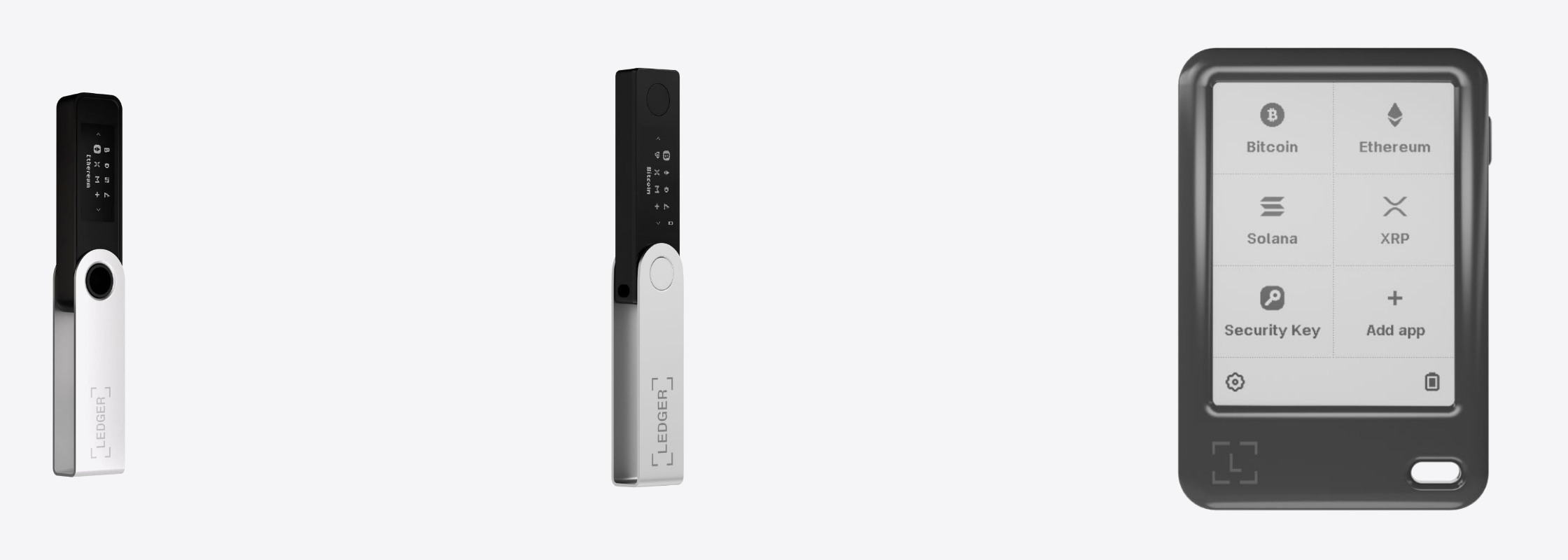
สรุปสั้นๆ ก่อนเลย
- 1️⃣ ถ้าใช้ iPhone ตัดรุ่น Nano S Plus ออกได้เลยครับ Ledger เขียนไว้เองตรงๆ ว่าใช้กับอุปกรณ์ iOS ไม่ได้ ไม่ใช่แค่ใช้ได้ไม่เต็มที่
- 2️⃣ Nano S Plus ได้ใบรับรองสูงกว่า Nano X ทั้งที่ถูกกว่าครึ่ง ฿2,060 ได้ CC EAL6+ ส่วน ฿4,200 ได้ CC EAL5+
- 3️⃣ Gen5 ใช้ชิปและใบรับรองชุดเดียวกับ Flex และ Stax คือ ST33K1M5 ที่ CC EAL6+
- 4️⃣ Gen5 แถม Ledger Recovery Key มาในกล่อง ทั้งไลน์มีแค่ Flex, Stax และ Gen5 ที่ใช้ของชิ้นนี้ได้
- 5️⃣ จ่ายเพิ่มแล้วได้จอกับการเชื่อมต่อ ไม่ได้แปลว่าปลอดภัยขึ้นเสมอไป เดี๋ยวแอดอธิบายยาวหน่อยด้านล่าง
📊 ตารางเทียบสามรุ่น
ก่อนจะลงรายละเอียด แอดสรุปเป็นตารางให้ดูรวดเดียวก่อนครับ ตัวเลขทุกช่องมาจากหน้าสเปกของ Ledger เอง
| หัวข้อ | Nano S Plus | Nano X | Nano Gen5 |
|---|---|---|---|
| ราคา | ฿2,060 | ฿4,200 | ฿7,540 |
| ใช้กับ iPhone | ไม่ได้ | ได้ | ได้ |
| ใช้กับ Android | ได้ | ได้ | ได้ |
| การเชื่อมต่อ | USB-C | Bluetooth, USB-C | Bluetooth, USB-C, NFC |
| จอ | OLED ขาวดำ 128 x 64 | OLED ขาวดำ 128 x 64 | E Ink สัมผัส 2.8 นิ้ว 300 x 400 |
| Secure Element | ST33K1M5 | ST33J2M0 | ST33K1M5 |
| ใบรับรอง | CC EAL6+ | CC EAL5+ | CC EAL6+ |
| Ledger Recovery Key | ไม่รองรับ | ไม่รองรับ | แถมในกล่อง |
| แบตเตอรี่ | ไม่มี ใช้ไฟจาก USB | มี | มี |
| ขนาดและน้ำหนัก | 62.4 x 17.4 x 8.2 มม. 21 ก. | 72 x 18.6 x 11.7 มม. 34 ก. | 79.4 x 53.3 x 8.6 มม. 46 ก. |
แถวที่แอดอยากให้เพื่อนๆ ดูจริงๆ มีสามแถว คือ ใช้กับ iPhone, ใบรับรอง และ Recovery Key แค่สามแถวนี้ก็เกือบจะเลือกได้แล้ว ที่เหลือเป็นรายละเอียดประกอบ
📱 คำถามเดียวที่ตัดสินได้เลย
ถ้าเพื่อนๆ ใช้ iPhone เป็นเครื่องหลัก ตอบได้ตั้งแต่บรรทัดแรกเลยครับ Ledger Nano S Plus ใช้กับ iOS ไม่ได้ และไม่ใช่แอดเดาเอง Ledger เขียนไว้ในหน้าสินค้าตัวเองตรงๆ ว่า "does not work with iOS devices"
สาเหตุอยู่ที่การเชื่อมต่อ Nano S Plus มีแค่ USB-C ทางเดียว ไม่มี Bluetooth ไม่มี NFC ส่วน iOS ก็ไม่เปิดให้แอปเชื่อมต่อกับอุปกรณ์แบบนี้ผ่านสาย เรื่องนี้เป็นข้อจำกัดของ iOS ไม่ใช่ความบกพร่องของตัวเครื่อง
ส่วน Nano X กับ Gen5 มี Bluetooth ทั้งคู่ จึงต่อกับ iPhone ได้จริง Nano X รองรับ iOS 14 ขึ้นไป Gen5 รองรับ iOS 15 ขึ้นไป
อันนี้แอดอยากย้ำ เพราะเป็นสาเหตุอันดับหนึ่งที่ลูกค้าซื้อผิดรุ่นแล้วต้องมาเปลี่ยน ราคา ฿2,060 ดูน่าสนใจมากจนหลายคนกดไปก่อน แล้วค่อยมารู้ทีหลังว่าเสียบกับ iPhone ไม่ได้ ใครใช้ Android หรือคอมพิวเตอร์เป็นหลักไม่ต้องกังวลข้อนี้เลยครับ
รายละเอียดข้อนี้แอดเขียนแยกไว้อีกบทความแล้ว ตามไปอ่านได้ที่รวมฮาร์ดแวร์วอลเล็ตที่ใช้กับ iPhone ได้
🔐 ชิปกับใบรับรอง เรื่องที่เข้าใจผิดกันบ่อย
ตรงนี้แอดว่าเป็นจุดที่คนเข้าใจผิดกันมากที่สุดครับ หลายคนคิดว่ายิ่งแพงยิ่งปลอดภัย ซึ่งกับ Ledger สามรุ่นนี้ไม่จริงเสมอไป
Nano S Plus ราคา ฿2,060 ใช้ชิป ST33K1M5 ผ่านมาตรฐาน CC EAL6+ ส่วน Nano X ราคา ฿4,200 ใช้ชิป ST33J2M0 ผ่าน CC EAL5+ อ่านไม่ผิดครับ รุ่นที่ถูกกว่าครึ่งได้ใบรับรองสูงกว่า
CC EAL ย่อมาจาก Common Criteria Evaluation Assurance Level เป็นระดับความเข้มงวดในการตรวจสอบชิป ตัวเลขสูงกว่าแปลว่าผ่านการตรวจที่หนักกว่า ไม่ได้แปลว่าปลอดภัยขึ้นเป็นเท่าตัว แต่ก็เป็นตัวเลขที่วัดได้จริงและเทียบกันได้
แล้วจ่ายเพิ่มเพื่ออะไร คำตอบคือ Bluetooth และการใช้กับ iPhone ไม่ใช่ชั้นความปลอดภัยที่สูงขึ้น แอดคิดว่าอันนี้ควรพูดกันตรงๆ เพราะเป็นข้อมูลที่ช่วยให้ตัดสินใจได้จริง
ส่วน Gen5 ราคา ฿7,540 กลับมาใช้ ST33K1M5 ที่ CC EAL6+ เท่ากับ Nano S Plus และเท่ากับ Flex กับ Stax ด้วย เพราะฉะนั้นถ้าวัดกันที่ชิปอย่างเดียว Gen5 ไม่ได้เหนือกว่า Nano S Plus เลย ที่ต่างกันคือของรอบๆ ชิปทั้งหมด

🖥️ ส่วนต่างราคาอยู่ที่จอ
Nano S Plus กับ Nano X ใช้จอ OLED ขาวดำ 128 x 64 พิกเซล กดปุ่มสองปุ่มข้างเครื่อง เวลาจะตรวจที่อยู่ปลายทางก่อนกดยืนยัน ต้องกดเลื่อนอ่านทีละท่อน
Gen5 เปลี่ยนตรงนี้ทั้งหมด เป็นจอ E Ink แบบสัมผัส 2.8 นิ้ว ความละเอียด 300 x 400 พิกเซล กระจกกันรอยและเคลือบกันแสงสะท้อน ที่อยู่ยาวๆ ขึ้นเต็มจอในครั้งเดียว
แอดอยากให้มองข้อนี้เป็นเรื่องความปลอดภัย ไม่ใช่ความสวยงามครับ เพราะขั้นตอนที่สำคัญที่สุดตอนโอนเหรียญคือการอ่านที่อยู่ปลายทางบนจอเครื่อง ไม่ใช่บนจอคอมหรือมือถือ มัลแวร์เปลี่ยนที่อยู่บนหน้าจอคอมได้ แต่เปลี่ยนบนจอฮาร์ดแวร์วอลเล็ตไม่ได้
จออ่านง่ายขึ้น แปลว่าโอกาสที่คนจะขี้เกียจอ่านแล้วกดผ่านๆ ก็น้อยลง นี่แหละคือของที่ได้จากการจ่ายเพิ่ม
อีกอย่างที่ Gen5 ได้เพิ่มคือ NFC ซึ่งเอาไว้ใช้กับ Recovery Key และ Security Key แตะทีเดียวจบ

🔑 Recovery Key ที่แถมมากับ Gen5
Ledger Recovery Key คือการ์ดที่เก็บวลีกู้คืนของเพื่อนๆ ไว้ในตัวการ์ดผ่าน NFC เวลาต้องกู้เครื่องก็แตะการ์ดแทนการพิมพ์คำทีละคำกลับเข้าไป
Gen5 แถมมาให้ในกล่องเลย ส่วนทั้งไลน์ Ledger ตอนนี้มีแค่สามรุ่นที่ใช้ของชิ้นนี้ได้ คือ Flex, Stax และ Gen5 ครับ Nano X และ Nano S Plus ใช้ไม่ได้ เพราะไม่มี NFC
ข้อดีชัดเจนคือลดความเสี่ยงตอนพิมพ์ผิด และไม่ต้องเอาชุดคำไปพิมพ์ที่ไหนอีก แต่แอดขอเตือนไว้อย่างหนึ่ง การ์ดใบนี้ก็คือชุดคำของเพื่อนๆ นั่นแหละ แค่อยู่ในรูปการ์ด ใครได้การ์ดไปก็ได้เหรียญไป เก็บแบบเดียวกับที่เก็บชุดคำ ไม่ใช่แบบเดียวกับที่เก็บบัตรเครดิต
และไม่ว่าจะใช้รุ่นไหน ชุดคำที่จดบนกระดาษยังต้องเก็บให้ดีอยู่ดี เรื่องนี้แอดเขียนไว้ยาวในบทความเรื่อง Seed Phrase
🎯 สรุปว่าใครควรซื้อรุ่นไหน
ใช้ Android หรือคอมพิวเตอร์เป็นหลัก งบจำกัด เอา Nano S Plus ครับ ฿2,060 ได้ชิปและใบรับรองระดับเดียวกับรุ่นบนสุด ที่เสียไปคือความสะดวก ไม่ใช่ความปลอดภัย
ใช้ iPhone และอยากได้ราคาสมเหตุสมผล เอา Nano X ฿4,200 Bluetooth ทำให้ต่อกับ iPhone ได้จริง แลกกับใบรับรองที่ต่ำกว่าหนึ่งขั้น
โอนบ่อย ยอดใหญ่ หรืออยากได้ของครบชุดจบในกล่องเดียว เอา Gen5 ฿7,540 จอสัมผัสอ่านที่อยู่ได้เต็มๆ ใบรับรอง CC EAL6+ มี NFC และแถม Recovery Key มาให้ด้วย
แล้ว Gen5 กับ Flex ล่ะ ชิปกับใบรับรองเท่ากัน มี Bluetooth และ NFC เหมือนกัน แถม Recovery Key เหมือนกัน ต่างกันที่ Flex ได้จอ 16 ระดับสีเทาหลังกระจก Gorilla Glass และกรอบอะลูมิเนียม ส่วน Gen5 เป็นจอขาวดำกรอบพลาสติก และราคาถูกกว่า ใครสนใจฝั่งนั้นแอดเทียบไว้แล้วในบทความเทียบ Flex กับ Stax
ข้อสุดท้ายที่แอดอยากฝากไว้ ไม่ว่าจะเลือกรุ่นไหน สิ่งที่ปกป้องเหรียญจริงๆ คือชุดคำกู้คืน ไม่ใช่ตัวเครื่อง เครื่องหายซื้อใหม่ได้ ชุดคำหายคือจบ

Ledger
฿2,060
- USB-C อย่างเดียว ไม่มี Bluetooth
- ชิป ST33K1M5 ผ่าน CC EAL6+
- ใช้กับ iPhone ไม่ได้
มี 10 สีให้เลือกที่หน้าสินค้า

Ledger
฿4,200
- Bluetooth ใช้กับ iPhone ได้ iOS 14 ขึ้นไป
- ชิป ST33J2M0 ผ่าน CC EAL5+
- มีแบตในตัว ชาร์จผ่าน USB-C
มี 6 สีให้เลือกที่หน้าสินค้า

Ledger
฿7,540
- จอ E Ink สัมผัส 2.8 นิ้ว 300 x 400
- ชิป ST33K1M5 ผ่าน CC EAL6+ เท่า Flex และ Stax
- แถม Ledger Recovery Key ในกล่อง
มี 4 สีให้เลือกที่หน้าสินค้า
❓ คำถามที่เจอบ่อย
ย้ายจากรุ่นเก่าไปรุ่นใหม่ ต้องโอนเหรียญไหม
ไม่ต้องครับ ทั้งสามรุ่นใช้มาตรฐาน BIP39 เหมือนกัน ใส่ชุดคำเดิมเข้าเครื่องใหม่ ยอดกลับมาครบเหมือนเดิม เพราะเหรียญอยู่บนบล็อกเชนไม่ได้อยู่ในเครื่อง แต่ถ้าเครื่องเก่าเคยมีคนอื่นเห็นชุดคำ ให้สร้างชุดใหม่แล้วโอนแทน
Nano S Plus ถูกกว่าครึ่งแต่ใบรับรองสูงกว่า แปลว่าดีกว่าเลยไหม
ในแง่ชิปคือใช่ครับ แต่ใบรับรองวัดแค่ตัวชิป ไม่ได้วัดว่าใช้งานสะดวกแค่ไหน ถ้าใช้ iPhone ก็ใช้ไม่ได้เลย ต่อให้ใบรับรองสูงกว่าก็ไม่มีประโยชน์ เลือกจากอุปกรณ์ที่ใช้จริงก่อน แล้วค่อยดูสเปก
จำเป็นต้องใช้ Recovery Key ไหม
ไม่จำเป็นครับ เป็นของเสริมที่ทำให้กู้เครื่องง่ายขึ้น ไม่ได้บังคับใช้ ต่อให้มีการ์ดแล้วก็ควรจดชุดคำเก็บไว้อีกชุดอยู่ดี เพราะการ์ดหายหรือพังได้เหมือนของทุกอย่าง
ซื้อจาก SIAMBC ต่างจากสั่งจากต่างประเทศยังไง
ของอยู่ในไทย ส่งถึงเร็ว มีหน้าร้านให้เข้ามาดูเครื่องจริงก่อนตัดสินใจได้ และถ้าติดปัญหาตอนตั้งค่าก็ทักถามได้เลย ที่สำคัญกว่านั้นคือฮาร์ดแวร์วอลเล็ตเป็นของที่ไม่ควรซื้อจากคนกลางที่ไม่รู้จัก เรื่องวิธีดูว่าเครื่องถูกแกะมาก่อนหรือเปล่า แอดเขียนไว้ในบทความเรื่องวิธีดูเครื่องที่ถูกแกะ
🚨 กฎเหล็กข้อเดียวที่ต้องจำ
ใครก็ตามที่ขอวลีกู้คืนของเพื่อนๆ คือมิจฉาชีพ 100% ไม่มีข้อยกเว้น
ทาง SIAMBC และ Ledger ไม่มีวันขอ ไม่ว่าจะอ้างว่าเป็นการเคลมประกัน ยืนยันตัวตน อัปเดตระบบ หรือกู้คืนบัญชีก็ตาม ชุดคำนั้นคือกุญแจสู่เงินของเพื่อนๆ ใครได้ไป เงินหายทันที ไม่มีทางเรียกคืนครับ
SIAMBC เป็นตัวแทนจำหน่าย Ledger ที่ได้รับอนุญาตในไทย ทำเรื่องฮาร์ดแวร์วอลเล็ตมาตั้งแต่ปี 2559 มีหน้าร้านที่กรุงเทพฯ ให้เข้ามาดูของจริงและสอบถามก่อนตัดสินใจได้ครับ
แชร์:
Trezor Safe 7 vs Ledger Stax เทียบกันชัดๆ ตัวไหนคุ้มกว่า
Blockstream Jade คืออะไร และ Classic / Core / Plus ต่างกันตรงไหน