

Short answer
- A security key is a small physical authenticator used to verify access to online accounts through USB or NFC.
- FIDO2/WebAuthn security keys use public-key cryptography and bind each credential to the website that created it, making them substantially more resistant to phishing than SMS or one-time codes.
- A security key can work as a second factor after a password or hold a device-bound passkey for passwordless sign-in when the service supports it.
- Unlike OTP, a security key does not show the user a code that can be copied into a fake website.
- Register at least two keys, store the backup separately, and configure account recovery before relying on security keys for critical accounts.
Email, cloud services, social networks, password managers, and business systems still commonly begin with a password. Even a long and unique password can be stolen through a fake login page, malware, or a breached database. Adding an OTP improves security, but a person can still be tricked into sending that code to an attacker in real time.
A security key moves the most important part of authentication into a physical device. The user plugs it into a USB port or taps it over NFC, then confirms the request by touching the key, entering a PIN, or using a fingerprint, depending on the service and key.
The important difference is not simply that another device is involved. The key cryptographically checks the website requesting authentication. A credential created for the legitimate website cannot normally be reused by a lookalike domain.
What is a security key?
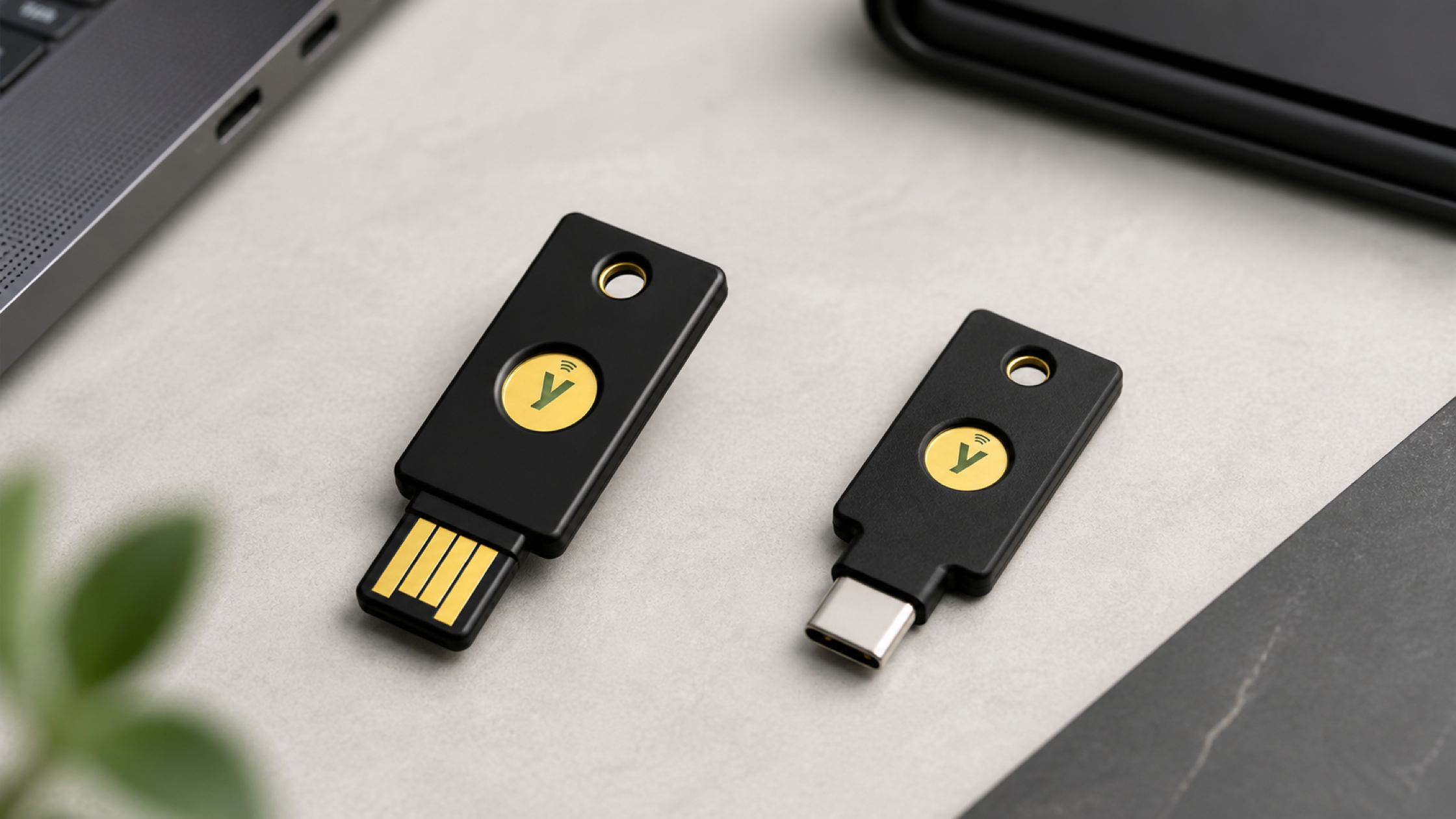
A security key is an external authenticator that stores cryptographic credentials in hardware. It is usually shaped like a small USB drive or keyring tag and connects to computers and phones through USB-A, USB-C, or NFC.
Most modern security keys support FIDO2, which combines the W3C Web Authentication API, or WebAuthn, with the FIDO Alliance Client to Authenticator Protocol, or CTAP. FIDO2 supports passwordless, second-factor, and multi-factor sign-in experiences.
Security keys can be registered with compatible services such as Google, Microsoft, Apple, GitHub, password managers, and enterprise identity providers. Actual support depends on the service, operating system, browser, and key model, so compatibility should be checked before purchase.
How does a security key work?
When a security key is registered with a website, it creates a credential specifically for that service using asymmetric, or public-key, cryptography.
- The private key remains inside the security key and is not intended to leave the device.
- The public key is sent to the online service for signature verification.
- At sign-in, the service sends the browser a unique challenge.
- The security key checks the website context and signs the challenge with its private key.
- The service verifies the response with the public key and grants access if it is valid.
The service does not need to store a shared FIDO secret comparable to a password. If its database is breached, a stolen public key cannot be used to generate the signature produced by the private key inside the device.
What does touching the key prove?
Touching a standard key usually confirms user presence: a person is physically present and approves the request. It does not necessarily scan a fingerprint. Biometric models can verify a registered fingerprint, while non-biometric models may combine a touch with a FIDO2 PIN when user verification is required.
Why security keys resist phishing
An OTP is visible and transferable. A convincing fake website can ask for the code and immediately relay it to the real service before it expires. This is a common form of adversary-in-the-middle phishing.
A FIDO security key does not provide a code that can be typed elsewhere. Its credential is bound to the relying party and website domain. The browser and authenticator check the origin making the request. On a fake domain, the credential for the legitimate site does not match, so the key cannot produce a response accepted by the real service.
Phishing-resistant does not mean resistant to every attack. An attacker may still target an already authenticated session, compromise an endpoint, exploit a service vulnerability, or abuse a weak account-recovery process. Security keys should therefore be combined with software updates, session monitoring, and well-designed recovery policies.
Security keys vs OTP and passkeys
| Method | Primary purpose | Phishing resistance | Important consideration |
|---|---|---|---|
| SMS OTP | Delivers a one-time code over the mobile network | Low | Exposed to code phishing and SIM-related attacks |
| Authenticator app | Generates a time-based OTP on a phone | Moderate | Stronger than SMS, but the code can still be relayed |
| Synced passkey | Stores a FIDO credential that may sync through a provider | High | Convenient and recoverable, but tied to a sync ecosystem |
| FIDO2 security key | Stores a device-bound passkey or FIDO credential in a physical key | High | Requires a backup-key and recovery plan |
Are a security key and a passkey the same thing?
Not exactly. A passkey is a FIDO credential. A security key is a physical authenticator that can store a device-bound passkey. Passkeys can also be held by a phone, computer, or password manager and may be synchronised across devices.
What is the difference between a security key and a YubiKey?
Security key is the product category; YubiKey is a Yubico product name. Yubico's Security Key Series focuses on FIDO2/WebAuthn and U2F. The YubiKey 5 Series adds protocols such as OATH, PIV, OpenPGP, and OTP for enterprise and legacy environments.
Who should use a security key?
- Administrators and owners of critical accounts: cloud consoles, domains, source-code repositories, password managers, and privileged accounts.
- Businesses and public-sector organisations: teams moving to phishing-resistant MFA or controlling the type of authenticator employees may use.
- People exposed to targeted attacks: executives, journalists, activists, page administrators, and public figures.
- Finance and approval teams: accounts that approve payments, access customer data, or change other users' permissions.
- People who work across several devices: one compatible security key can be used across computers and phones without importing a shared secret into each device.
SIAMBC View
- Protect the primary email account and password manager first, because they can often reset access to many other services.
- Two security keys should be treated as the starting set, not one primary key followed by a backup purchase after the primary is lost.
- FIDO-only keys cover many modern services. Organisations using PIV, OpenPGP, OATH, or legacy systems should evaluate multi-protocol models.
- An SMS-only recovery path can undermine a strong security-key policy if it lets an attacker bypass the key.
How to choose a security key
1. Match the connector to your devices
USB-A remains common on older computers and office desktops. USB-C suits modern notebooks, Android phones, and USB-C iPhones. NFC is useful when the same key must work conveniently with both a phone and computer.
2. Decide between FIDO-only and multi-protocol
For compatible Google, Microsoft, Apple, social, and password-manager accounts, a FIDO-only key is often sufficient. Environments using smart card/PIV, OpenPGP, OATH-TOTP, challenge-response, or Yubico OTP should evaluate a multi-protocol YubiKey 5 model.
3. Consider PIN and biometric verification
FIDO2 keys can use a PIN for user verification. Bio models add fingerprint verification on the key, which can reduce PIN entry when supported. A standard touch key remains suitable when fingerprint verification is not required.
4. Verify standards and service support
Look for FIDO2/WebAuthn and FIDO U2F support, then check the vendor's compatibility list and the target service. Enterprise buyers may also need to assess FIDO certification, attestation, AAGUID policy, identity-provider controls, and inventory requirements.
5. Plan key quantity and recovery
The primary key should stay with the user, while a backup should be stored securely elsewhere. Apple requires at least two keys during setup, while other services have different requirements. Organisations need documented issuance, replacement, revocation, and identity-verification processes.
How to set up a security key safely
- Buy through a manufacturer or trusted supplier and inspect the product when it arrives.
- Update the operating system and browser before registration.
- Set a FIDO2 PIN through the vendor's recommended process and do not reuse a sensitive PIN.
- Register the primary and backup keys with the same accounts during the same setup session.
- Name each key in account settings, such as “daily key” and “home backup.”
- Store recovery codes offline and make sure recovery methods are not weaker than the intended policy.
- Test every key before signing out or removing an older authentication method.
- If a key is lost, use the backup to sign in and revoke the missing key immediately.
A security key is not a general-purpose USB storage device. Its credentials cannot be backed up by copying files. The correct backup is another key registered with each account, combined with a planned recovery process.
Recommended security keys by use case
Security Key NFC by Yubico: FIDO for USB-A and mobile
A cost-effective option for FIDO2/WebAuthn and U2F. It connects to computers over USB-A and taps compatible phones over NFC.

Yubico
฿1,390
- USB-A and NFC
- FIDO2/WebAuthn and FIDO U2F
- Battery-free authentication for modern online accounts
Security Key C NFC by Yubico: FIDO for USB-C and mobile
Designed for modern USB-C notebooks and phones, with NFC for tap-based mobile authentication.

Yubico
฿1,790
- USB-C and NFC
- FIDO2/WebAuthn and FIDO U2F
- Suitable for current computers and phones
YubiKey 5 NFC: Multi-protocol security with USB-A
For users and organisations that need FIDO plus OATH, PIV, OpenPGP, OTP, or other enterprise and legacy capabilities.

Yubico
฿2,490
- USB-A and NFC
- FIDO2, U2F, OATH, PIV, OpenPGP, and OTP
- Suitable for multi-system and enterprise use
YubiKey 5C NFC: Multi-protocol security with USB-C
Combines multi-protocol YubiKey 5 capabilities with USB-C and NFC for modern desktop and mobile environments.

Yubico
฿2,690
- USB-C and NFC
- FIDO2, U2F, OATH, PIV, OpenPGP, and OTP
- Works across modern desktop and mobile devices
Prices and availability may change. Check the product page before ordering. If an organisation is uncertain which protocols it requires, confirm with its administrator before selecting a model.
Frequently asked questions
Can a security key replace a password?
Yes, when a service supports passwordless sign-in or passkeys on a FIDO2 security key. Other services continue to use the key as a second factor after a password.
Can someone access my account immediately if they find my key?
They generally still need to know the account and may need its PIN or another verification step. Do not rely on that limitation: revoke a missing key from every account as soon as possible.
How many security keys should I buy?
At least two for most people: one for daily use and one stored separately as a backup. Some services, including Apple Account, require two keys at setup.
Does a security key need internet access or a battery?
Typical USB and NFC keys need neither their own internet connection nor a battery. The computer or phone still needs its normal network connection to reach the service.
Does a security key stop every type of account attack?
No. It substantially reduces password theft, credential replay, and phishing risk, but it cannot prevent every malware attack, session theft, service vulnerability, or recovery-process failure.
Can a security key work with a phone?
Yes, when the phone, operating system, and service support it. NFC and USB-C are usually the most convenient mobile connection methods.
Summary
A security key is a physical authenticator that requires possession of the device and a cryptographic response to sign in. With FIDO2/WebAuthn, credentials are bound to the registered website, making security keys much more resistant to fake login pages than SMS or OTP.
Choose based on the services, connectors, and protocols you actually need. A FIDO-only USB/NFC key covers many modern accounts, while organisations with smart-card, OpenPGP, or legacy OTP requirements may need a multi-protocol model.
Whatever the model, register at least two keys, test both, keep the backup and recovery codes separately, and ensure the account-recovery process does not create a weaker bypass.
Sources
- FIDO Alliance: User Authentication Specifications and FIDO2 overview
- FIDO Alliance: Passkeys and phishing-resistant authentication
- Google Account Help: Use a security key for 2-Step Verification
- Microsoft Learn: Sign in with a FIDO2 security key
- Apple Support: Security Keys for Apple Account
- Yubico: Security Key and YubiKey product families
This article references publicly available information checked on 22 August 2026. Standards support, operating systems, online services, firmware, prices, and product availability may change. Verify current information with the service provider and product page before setup or purchase.
Conclusion
A security key is a physical authenticator that uses FIDO2 and WebAuthn to protect online accounts from phishing. Learn how it works, how it differs from OTP and passkeys, and how to choose the right key.

Share:
Trader Who Made $49 Million Shorting Crypto Lost $24 Million on Ether in 12 Seconds
How to Withdraw Bitcoin from Bitkub to a Hardware Wallet: Step by Step