

The short answer
- Choose the OneKey Classic 1S if you want a slim, capable hardware wallet at a sensible price and are comfortable using physical buttons.
- Choose the OneKey Pro if you make transactions frequently and will benefit from a large touchscreen, fingerprint unlock, QR signing and wireless charging.
- Both devices use EAL6+ secure elements and support USB-C and Bluetooth. OneKey also publishes its firmware and apps as open source with reproducible builds.
- The Pro mainly buys you a more capable interface and more ways to sign. Its higher price does not make the Classic 1S an unsafe choice.
- For occasional transfers and long-term holding, the Classic 1S is usually enough. Active users and people who review complex transactions may prefer the Pro.
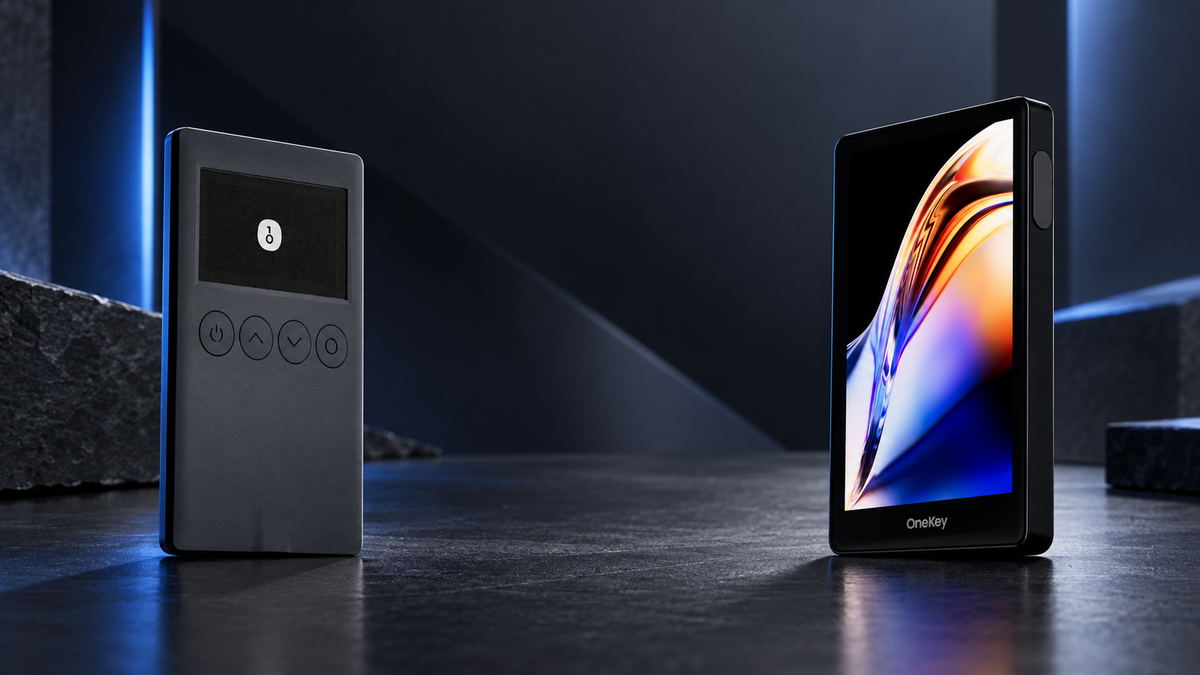
The OneKey Classic 1S and OneKey Pro protect private keys on dedicated hardware, but they are built for different routines. The Classic 1S prioritises portability and value. The Pro is designed for people who want a larger interface, more connection options and fewer compromises during frequent use.
That makes this less of a contest over which specification sheet is longer and more a question of how often you sign transactions, which devices you connect to, and how much information you want to see before confirming.
Quick verdict: which OneKey should you buy?
The Classic 1S is the better starting point for most buyers. It covers the essentials, works with phones and computers, and costs substantially less. If your normal routine is to buy crypto, move it into self-custody and transact only occasionally, there is little reason to pay for features you may not use.
The Pro makes sense when the hardware wallet is part of your weekly workflow. Its 3.5-inch touchscreen is easier to read, the camera enables air-gapped QR signing, and fingerprint unlock removes friction when you handle several accounts or repeated approvals.
In one line: Classic 1S is the value-focused everyday wallet; Pro is the flagship for a richer interface and greater connection flexibility.
OneKey Classic 1S vs OneKey Pro specifications
| Feature | OneKey Classic 1S | OneKey Pro |
|---|---|---|
| Form | Thin, card-sized body | Handheld touchscreen device |
| Display | 1.54-inch monochrome OLED, 128 × 64 | 3.5-inch colour IPS touchscreen, 480 × 800 |
| Controls | Four physical buttons | Multi-touch display with haptic feedback |
| Secure elements | One EAL6+ chip | Four EAL6+ chips |
| Connections | USB-C and Bluetooth | USB-C, Bluetooth, QR and NFC |
| Air-gapped QR signing | No | Yes, using the built-in camera |
| Fingerprint reader | No | Yes |
| Battery | 110 mAh, USB-C charging | 530 mAh, USB-C and Qi charging |
| Weight | About 20.5 g | About 65 g |
| Best for | Beginners, long-term holders and value buyers | Frequent users, DeFi and larger on-device reviews |
Design, display and controls
Classic 1S: compact and deliberate
At 5.2 mm thick and roughly 20.5 g, the Classic 1S is easy to store and travel with. Four physical buttons handle navigation and confirmation. The interface is simple, predictable and well suited to users who prefer a clear mechanical action before approving a transaction.
The monochrome display is naturally more limited when showing long addresses or smart-contract details. It still performs the critical job of letting you verify information on trusted hardware, but reviewing longer data takes more scrolling and attention.
Pro: a more spacious interface
The Pro's 3.5-inch colour touchscreen can show more information at once and makes PIN entry, address checks and device settings feel closer to using a modern phone. The larger body also makes room for a camera, haptics and fingerprint reader.
It is heavier than the Classic 1S, but that rarely matters if the wallet normally lives on a desk or in a safe. Buyers who expect a credit-card form factor should choose the Classic; buyers who prioritise readability will appreciate the Pro.
How different is the security?
Both models use EAL6+ secure elements and keep transaction approval on the device. OneKey publishes its firmware and apps as open source and supports reproducible builds, allowing technically capable reviewers to compare released software against the public code.
The Pro has four secure elements and adds fingerprint authentication. That is a more elaborate hardware design, but it would be misleading to call it four times safer. Secure self-custody still depends on a strong PIN, careful verification on the device, legitimate software updates and safe offline storage of the Seed Phrase.
Never share confidential wallet data: SIAMBC and OneKey will never ask for your Seed Phrase, passphrase, Private Key or PIN. A request for any of these is a scam, regardless of whether it is presented as support, warranty service or an update.
USB-C, Bluetooth and QR signing
The Classic 1S connects over USB-C or Bluetooth, covering typical desktop and mobile use. A cable is straightforward at a computer, while Bluetooth is more convenient on a phone.
The Pro adds air-gapped QR signing. The companion app prepares a transaction as a QR code, the Pro scans and signs it, and a second QR code carries the signature back. No cable or radio connection is required during that process.
Air-gapped signing is an additional workflow, not a substitute for verification. You must still check the destination, amount and transaction details on the Pro before approving anything.
What they feel like to use
If you use a hardware wallet once or twice a month, the Classic 1S feels refreshingly direct: connect, review, confirm and put it away. The smaller display and buttons are unlikely to be a burden for occasional transfers.
When you sign several transactions, interact with DApps or manage multiple accounts, the Pro becomes easier to justify. More screen space improves legibility, fingerprint unlock reduces repetition, and QR signing gives you another way to separate the signer from your internet-connected device.
Battery preferences also matter. The Classic 1S has a small battery to preserve its thin profile, while the Pro has a larger cell and Qi charging. If you specifically want a battery-free OneKey, look at the Classic 1S Pure rather than either device compared here.
Who should choose each model?
Choose the OneKey Classic 1S if you:
- want your first hardware wallet without unnecessary complexity;
- mainly transfer assets into long-term storage;
- need both phone and computer support;
- care about a slim, lightweight design and lower price; or
- are comfortable reviewing transactions with buttons and a monochrome display.
Choose the OneKey Pro if you:
- sign transactions regularly and value a larger display;
- use DeFi, DApps or multiple accounts frequently;
- want air-gapped QR signing;
- want fingerprint unlock, haptics and wireless charging; or
- prefer a touchscreen experience and expect to keep the device for years.
Is the OneKey Pro worth the extra cost?
For long-term storage and occasional transfers, the Classic 1S already delivers the important parts of a hardware wallet. Paying more for the Pro would not add much value if the camera, large screen and fingerprint reader stay unused.
For active users, the calculation changes. A better interface saves time every week, and clearer transaction review can make good security habits easier to follow. In that context, the price difference is spread across years of use rather than judged on purchase day alone.
Do not buy the Pro simply because a higher price appears safer, and do not buy the Classic solely because it is cheaper. The best wallet is the one whose screen and workflow encourage you to verify every transaction properly.
Shop the compared OneKey models

OneKey
- 5.2 mm thin and approximately 20.5 g
- EAL6+ secure element
- USB-C and Bluetooth connectivity
Prices and promotions may change. Check the product page before ordering.

OneKey
- 3.5-inch colour touchscreen
- Air-gapped QR signing and fingerprint unlock
- USB-C and Qi wireless charging
This button selects Black. White is available from the product page.
Frequently asked questions
Is the OneKey Classic 1S secure enough for long-term storage?
Yes, when it is sourced from a trusted seller, set up personally and used with sound backup practices. Its lower price does not remove the core security features required for normal self-custody.
Is the OneKey Pro automatically safer because it has four secure elements?
It has a more sophisticated architecture, but security cannot be reduced to a chip count. Safe Seed Phrase storage and careful on-device verification remain essential on both models.
Can the Classic 1S connect to an iPhone?
Yes. It can connect to the OneKey App over Bluetooth. Desktop users can choose USB-C or Bluetooth where supported.
Does everyone need air-gapped QR signing?
No. USB-C and Bluetooth are practical options for most users when transactions are verified on the hardware screen. QR signing is valuable for people who specifically want a workflow without a wired or radio connection.
Which model is better as a first hardware wallet?
The Classic 1S is the more economical place to start. If you already know that you want a touchscreen, frequent use or QR signing, buying the Pro first may avoid an upgrade later.
Final recommendation
The OneKey Classic 1S is the sensible choice for most people. It is light, easy to store, works across mobile and desktop, and includes the security foundations expected from a modern hardware wallet.
The OneKey Pro is the better tool for demanding workflows. Its large display, QR signing, fingerprint reader and wireless charging improve everyday use, but they are worth paying for only when those features solve a real need.
Whichever model you choose, create the wallet and Seed Phrase yourself, verify addresses on the hardware screen, and keep the backup separate from the device. SIAMBC can help you choose a compatible model and explain the setup process without ever needing access to your confidential wallet information.
Sources
- OneKey Classic 1S official product information
- OneKey Pro official product information
- OneKey Help Center: passphrases and hidden wallets
Product information checked on 18 September 2026. Features, compatibility and pricing may change, so review the current product page before ordering. Written by Bank for educational purposes; this is not investment advice.



Share:
Is a Second-Hand Hardware Wallet Safe? What to Check Before Storing Crypto
Lost Your Ledger? What Happens to Your Crypto and What to Do Next