

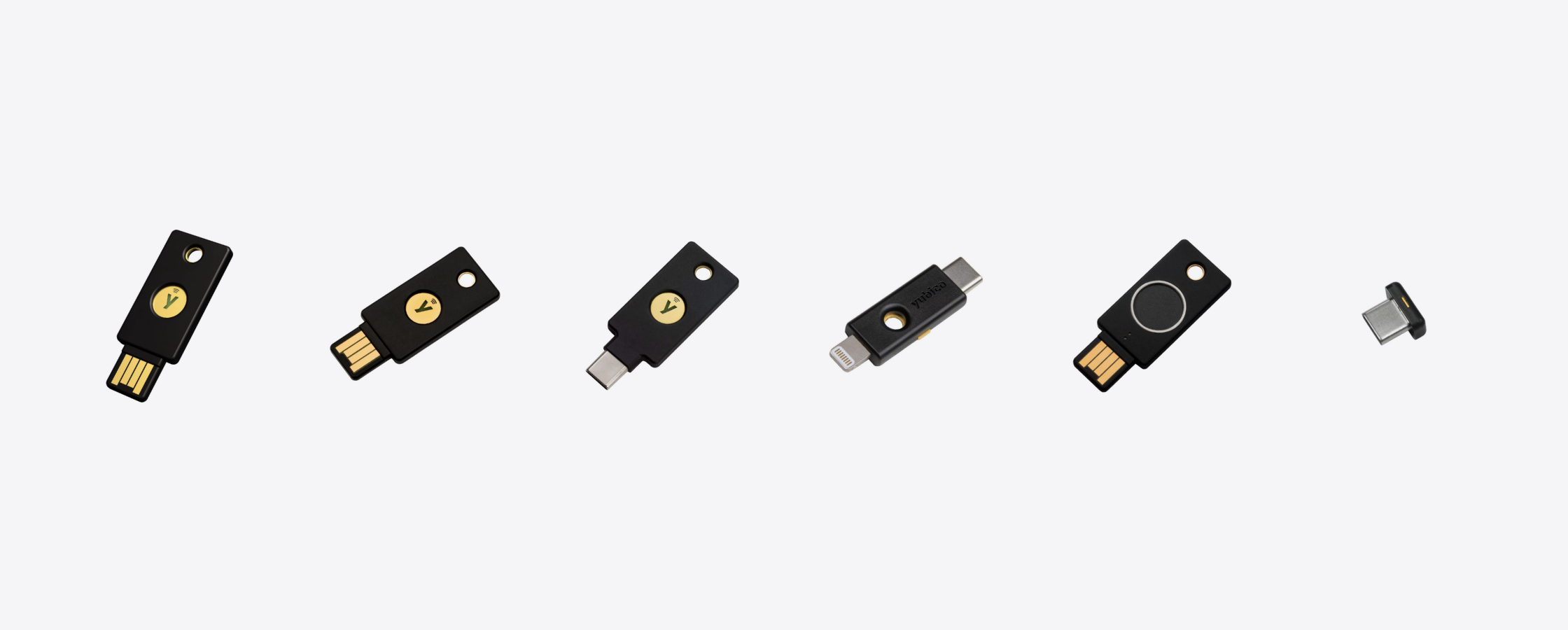
Key facts
- SMS one-time codes can be stolen, and are being stolen. Through SIM swaps, through fake pages that relay the code to the criminal in real time, and through malware that reads incoming messages.
- An authenticator app is better than SMS but still phishable. It is still a number you read and type, and if you type it into a fake page the result is identical.
- A security key has nothing to type. The key checks the domain before it signs. On a lookalike site it refuses, even if you want it to sign.
- Google has required this of more than 85,000 employees since early 2017 and has had no reported or confirmed account takeovers since.
- It stops accounts being taken over. It does not stop you being talked into sending money. Those are different problems, and the second still depends on you.
The scale of the problem in Thailand
The Global Anti-Scam Alliance's State of Scams in Thailand 2025 report puts Thai losses to online fraud at 115.3 billion baht over the year, off roughly 173 million scam calls and text messages.
The proportions matter as much as the total. 72 percent of Thai adults encountered a scam attempt, 60 percent were successfully scammed within twelve months, and 14 percent lost money, an average of 12,955.6 baht each. By March 2026 police were reporting losses back up at around 70 million baht a day.
Of all the routes criminals use to reach a victim's accounts, the one breached most often is the six-digit code your bank sends you by SMS.
What OTP was built to solve
The one-time password was designed to fix one clear problem: leaked passwords.
Before it, anyone who obtained your password was in. It did not matter whether they got it from a breached database, by guessing, or because you reused it everywhere. Adding a code sent to your phone meant the password alone was no longer enough. The attacker needed your phone as well.
That logic still holds. The problem is the assumption underneath it: that your phone number belongs only to you, and that you will only ever type the code into the real site. Both assumptions have failed.
Three ways your OTP gets stolen
One: the SIM swap
In a SIM swap the criminal has a replacement SIM issued for your number, using personal details gathered beforehand or an insider to process it. Once the new SIM activates, the one in your phone drops off the network, and every SMS, every OTP included, arrives on their device instead.
In Thailand, where banking apps and e-wallets lean almost entirely on SMS codes, one successful swap can empty an account in minutes. Victims usually notice only when their phone loses signal, which most people read as a network fault rather than an attack.
Two: the fake page that relays your code instantly
This one destroys the most common misconception, that a code expiring in five minutes is safe because a criminal cannot use it in time.
They are not saving your code for later. They stand up a page that looks exactly like your bank or your exchange. You enter your password, the page passes it straight to the real site, the real site sends the OTP to your phone as normal, you enter the OTP into the fake page, and it forwards that to the real site within seconds.
Every part of this looks correct. The SMS comes from the bank's real number, the code is genuine, and it is used well inside its window. The only thing wrong is that you typed it somewhere that was not your bank.
Three: malware that reads your messages
An app installed from outside the official stores, or one granted message and accessibility permissions, can read incoming SMS without you doing anything at all. Here your number is still yours and the SIM is still in your phone, but the code is read the moment it arrives.
What about an authenticator app
Moving from SMS to an app such as Google Authenticator is a worthwhile upgrade. It removes the SIM swap problem entirely, because the code is generated on your device and never travels over the mobile network.
It does not fix the second problem. A six-digit code in an app is still a number you read and type into a website. If that site is fake, the outcome is exactly the same as with SMS.
The real dividing line is not SMS versus app. It is between something you type and something with nothing to type.
What makes a security key different
A security key is a device about the size of a door key that plugs into a USB port or taps against a phone over NFC. When you first register it, the key generates a pair of keys for that specific site. The secret half never leaves the device, and the pair is bound to the site's domain name.
At login the browser tells the key which domain it is talking to. The key compares it with the domain it was registered against, and if they do not match it refuses to sign. That is the end of the attempt.
The consequence is larger than it sounds. A fake page can be pixel-perfect and will still be on a different domain, because the domain is the one thing a criminal cannot forge. The key sees what your eye misses, and it does not depend on your attention at all.
Equally important, there is no code to read, no number to type, and nothing to repeat to someone on the phone. Even if a caller convinces you completely, there is nothing on the key you could hand over.
Yubico's keys have no battery, no network connection and no software to update. All three are attack surfaces that were removed at the design stage.
The most direct evidence comes from Google. It has required more than 85,000 employees to use security keys in place of passwords and one-time codes since early 2017, and has had no reported or confirmed employee account takeovers since.
If the mechanics of the device itself are what you want first, our earlier explainer covers what a YubiKey is and how it protects an account from the ground up.
Thai law has moved the liability
The Emergency Decree on Measures for the Prevention and Suppression of Technology Crimes (No. 2), B.E. 2568, came into force on 13 April 2025. Under it, banks, telecom operators, e-wallet providers and social media platforms share liability for losses caused by fraud, with the court weighing each party's negligence. Failing to follow the required measures carries a fine of up to 500,000 baht, and the individual responsible can face up to one year in prison, a fine of up to 100,000 baht, or both.
Separately, on 1 August 2025 the Personal Data Protection Committee issued eight fines totalling 14.5 million baht. The largest, 7 million baht, went to a computer retailer that had no Data Protection Officer and did not report a breach. Another, against a state agency, was 153,120 baht, and one of the reasons given plainly was the use of weak passwords. Its system developer, as data processor, was fined the same amount.
For a business, that moves authentication out of the IT department's technical backlog and into a category that now has published fine amounts attached to it.
What you can actually use it with
Services supporting FIDO2/WebAuthn today already cover most people's highest-value accounts: Google, Microsoft, Apple, Facebook, Instagram, X, LinkedIn, GitHub, Dropbox, password managers such as 1Password and Bitwarden, and the major crypto exchanges including Binance, Coinbase and Kraken.
In Thailand, Bitkub offers passkeys, which are built on the same standard. Whether a separate physical key can be registered as one of those passkeys is worth checking in your own account's security settings, because services enable it at different times.
One thing needs saying plainly: most Thai banking apps do not support security keys. Banks have gone with in-app approval and face scanning instead. So the key will not be sitting in front of your banking app.
What it does protect is what sits behind your money: your email. Email is the account that can reset almost every other account. Anyone who reaches your email can work through the rest in order. Putting a key on that one account does more than putting one on ten others combined.
Which model to buy

The first thing to know, before looking at prices: the cheapest key and the most expensive key are equally phishing-resistant, because both use FIDO2/WebAuthn. What the price buys is capability unrelated to phishing.
The Security Key NFC supports FIDO2/WebAuthn and FIDO U2F only. The YubiKey 5 Series adds Yubico OTP, OATH-TOTP, OATH-HOTP, PIV smart card and OpenPGP. The difference most people actually use is that a YubiKey 5 can hold your TOTP codes on the key itself, letting you drop the authenticator app entirely. The Security Key cannot.

Yubico
฿1,390
- USB-A, and taps against any phone with NFC
- FIDO2/WebAuthn and FIDO U2F only
- The cheapest way to make an account phishing-resistant
If the goal is to stop your email and social accounts being taken over, this model does the whole job and is the most sensible place to start.

Yubico
฿2,490
- USB-A, and taps against any phone with NFC
- Adds Yubico OTP, OATH-TOTP, PIV smart card and OpenPGP
- Can replace an authenticator app as well as a password

Yubico
฿2,690
- USB-C, and taps against any phone with NFC
- Same protocol support as the YubiKey 5 NFC
- The right choice for a recent MacBook or Android phone

For the connector, go by the device you sign in on most often. Desktops and older laptops take USB-A; recent MacBooks and Android phones take USB-C. If you have an iPhone still on Lightning and would rather plug in than tap, the YubiKey 5Ci carries both connectors on one body. The Nano models are made to live permanently in a port, sitting almost flush, which suits a machine that never leaves the desk.

The Bio models add a fingerprint sensor to the key, which lets them replace the password outright without typing a PIN. The fingerprint is stored and matched on the key alone, never sent to a website or held on a server. That suits shared computers, or a workplace where you would rather not type a PIN in front of other people.
Limits worth knowing before you buy
Buy two. Register both on every account and keep the second somewhere separate. A single key lost with no backup means you are locked out of your own accounts too. This is the most common reason people abandon the method halfway.
Not every service supports it. Check the accounts you actually want to protect before buying. If none of them support it, the key is not useful to you yet.
It does not stop you being talked into sending money. This matters most in the Thai context. The same report puts investment scams at 66 percent of victims, shopping scams at 63 percent and job scams at 53 percent. Those all end with the victim transferring money themselves, from their own account. A security key stops other people getting into an account. It does not stop the account holder doing what they intended to do.
You still need good passwords. The key is a second factor. It does not make a reused password safe.
Common questions
If I lose the key, can whoever finds it get into my accounts?
No. Signing in still requires the account password, or the key's own PIN, alongside it. The key by itself is not a skeleton key. Once you know it is gone, use your backup key to remove the lost one from your accounts.
Does it need charging?
No. There is no battery and nothing to degrade. It draws power from the port it is plugged into, or from the phone's NFC field while in use.
If I lose my phone, can I still get in?
Yes, and this is an advantage people overlook. The key is not tied to a number or to one handset, so it works from any computer. SMS codes and authenticator apps are tied to the phone you lost.
What if I cannot set it up myself?
Message us on LINE, or come to the shop and we will set it up and register the key against your accounts at the counter, free.
Worth remembering
- SIAMBC will never ask you for your password, an OTP code or a PIN, for any reason, whether it is presented as a warranty claim, identity verification or help with setup.
- Buy security keys only from a seller you can identify. An authentication device from a source you cannot verify defeats the entire reason for buying one.
SIAMBC has sold security hardware since 2016 and is an authorized Yubico reseller in Thailand. Our Bangkok shop is open if you want to see one in person or have us set it up with you, with support in Thai and English.
Share:
The Coldcard Aftermath: Where the Bitcoin Actually Went