

Key facts
- The Trezor One and Model T are discontinued. Trezor removed both from its own shop on 8 January 2026 but says they remain available from official resellers for a limited time, with security updates until at least 2036.
- The secure element is the real dividing line. The One and the Model T keep your keys on a general-purpose chip. All three Safe models add a dedicated security chip, and the Safe 3 is the cheapest way into it.
- The Safe 7 is the only model with Bluetooth, and the only one you can actually send from on an iPhone. Every other Trezor is view-only on iOS: you can watch balances but not sign a transaction.
- The Trezor One has hard, checkable limits. No XRP, SOL, ADA or XMR support, no multi-share backup, and recovery words must be typed on the computer.
- The Safe 7 does not protect your bitcoin from quantum attack. Its post-quantum work covers firmware signing and secure boot, not the keys holding your coins.
The two that are on their way out
Trezor removed the Trezor One and the Trezor Model T from its own online shop on 8 January 2026. Both remain available from official resellers for a limited time — that is Trezor's own wording, not our reading of it.
Discontinued does not mean dead. Trezor has committed to critical security updates for both until at least 2036, and the Model T additionally gets general maintenance and new coin support until at least 2031. A unit bought today has years of life in it.
But if you are buying to hold for a decade, or buying your first device and would rather not think about this again, the Safe line is the more direct answer.
The secure element is the real line

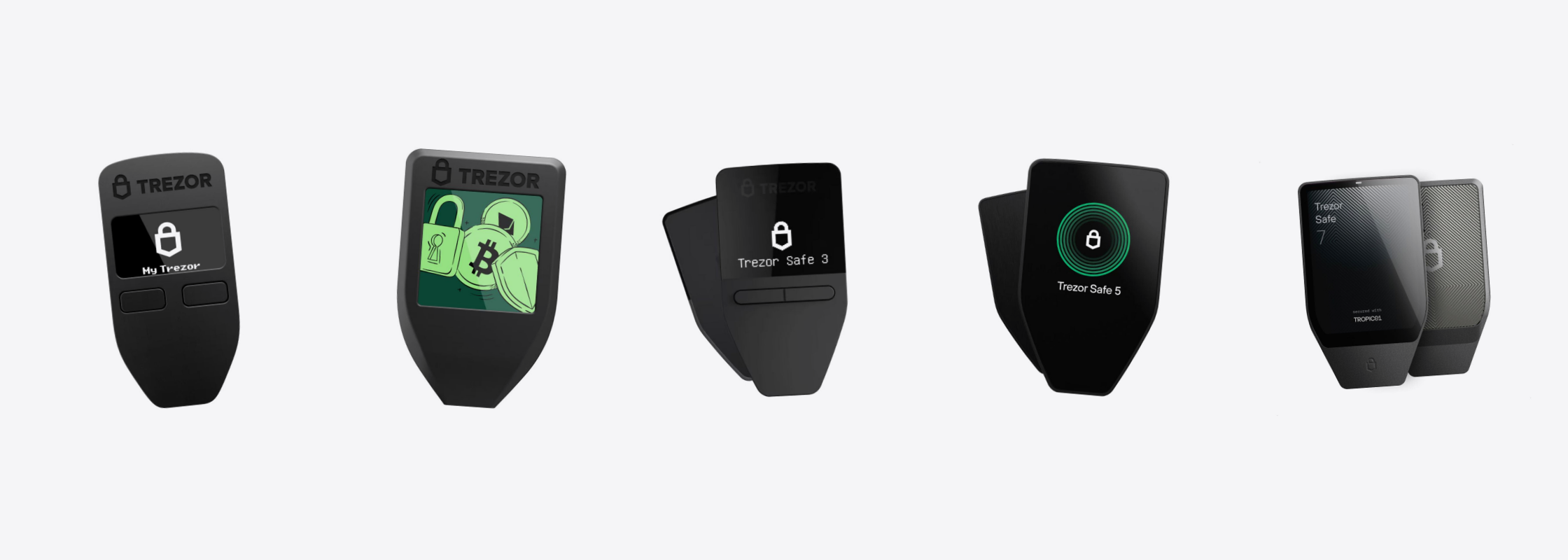
If you remember one thing from this article, make it this. The Trezor One and the Model T hold your keys on a general-purpose microcontroller. The Safe 3, Safe 5 and Safe 7 add a separate security chip.
The difference matters when the device is in someone else's hands — stolen, lost, or taken at a border. A dedicated chip is built to resist physical attack in a way a general-purpose one is not. If the device never leaves your possession, the difference barely shows.
The Safe 3 and Safe 5 use the same part, an Infineon OPTIGA Trust M. The Safe 7 carries two: TROPIC01, designed in-house by SatoshiLabs, alongside the OPTIGA Trust M.
A caution about EAL6+. That rating belongs to the chip, not the device, and it applies to the OPTIGA Trust M only. On the Safe 7 the TROPIC01 has no EAL rating at all — Trezor offers it as auditable rather than certified. A shop that tells you the whole device is EAL6+ is claiming more than the manufacturer does.
Touchscreen versus buttons
The Trezor One and the Safe 3 use two buttons and a 0.96-inch monochrome screen. The Model T, Safe 5 and Safe 7 are touchscreens.
What you feel every single time is PIN and passphrase entry. On the touchscreen models you type them on the device. On the button models the computer screen is part of the process.
One difference is heavier than the rest. The Trezor One requires you to type your recovery words on the computer when restoring — the exact step a hardware wallet exists to avoid. Every other model keeps that on the device.
The Safe 5's screen is the same size and resolution as the discontinued Model T's: 1.54 inches, 240 x 240. The screen is not a reason to pick the Safe 5 over a Model T. The Safe 7 genuinely is bigger, at 2.5 inches and 520 x 380.
Will it work with your phone
The Safe 7 is the only model in the line with Bluetooth. Trezor states it works on iOS and Android as well as macOS, Windows and Linux, and the radio can be switched off in settings if you would rather not use it.
The Model T has no iOS support. It works with computers, and with Android over USB-C. This matters because a misunderstanding about iPhone support is the single biggest reason a device comes back to our counter.
The Safe 3 and Safe 5 connect over USB-C only, and iOS does not support that connection. On an iPhone you can open the Trezor app and watch your balances, but you cannot sign a transaction to send. Sending needs a computer or an Android phone. The Trezor One and Model T behave the same way. This is a restriction in iOS, not a fault in the device.
All five side by side
| Model | One | Model T | Safe 3 | Safe 5 | Safe 7 |
|---|---|---|---|---|---|
| Status | Discontinued | Discontinued | Current | Current | Current flagship |
| Secure element | None | None | One | One | Two |
| Chip-level certification | None | None | EAL6+ | EAL6+ | EAL6+ on one chip only |
| Screen | 0.96in monochrome | 1.54in color | 0.96in monochrome | 1.54in color | 2.5in color |
| Confirming | Two buttons | Touchscreen | Two buttons | Touchscreen | Touchscreen |
| Connection | Micro USB | USB-C | USB-C | USB-C | USB-C and Bluetooth |
| Works with iPhone | View only | View only | View only | View only | Yes |
| Multi-share backup | No | Yes | Yes | Yes | Yes |
| microSD slot | No | Yes | No | Yes | Not stated |
| Battery | None | None | None | None | Yes |
| Cardano staking | No | Yes | Yes | Yes | Yes |
| Price | ฿2,990 | ฿6,590 | ฿3,690 | ฿7,490 | ฿11,900 |
Which one to buy

On a budget, but you want the secure element. Buy the Safe 3. It is the cheapest way into a dedicated security chip and it does everything most people need, including multi-share backup and Cardano staking.

Trezor
฿3,690
- Secure element, EAL6+ at chip level
- Two buttons, 0.96in monochrome screen
- Multi-share backup, needs firmware 2.7.2 or newer
- Four colors
Pick a color on the product page
You want a touchscreen without paying flagship money. Buy the Safe 5. PIN and passphrase go in on the device, and the microSD slot adds a second lock to the device itself.

Trezor
฿7,490
- Same secure element as the Safe 3
- 1.54in touchscreen with haptic feedback
- PIN and passphrase entered on the device
- microSD slot for device locking
Pick a color on the product page
You live on an iPhone, or you just want the best one. Buy the Safe 7. It is the only model with Bluetooth, the only one with a battery, and the only one rated IP54 in an aluminum body.

Trezor
฿11,900
- Two secure elements
- The only model with Bluetooth and iPhone support
- 2.5in touchscreen, aluminum body, IP54
- Battery, and Qi2 wireless charging
A Bitcoin-only edition is on the product page
You want a cheap spare or a piece of history. The Trezor One still works and still gets security updates for years. Know the limits first, and do not buy it if you hold XRP, SOL, ADA or XMR.

Trezor
฿2,990
- No secure element
- Micro USB, to a computer only
- No XRP, SOL, ADA or XMR support
- Recovery words typed on the computer
Black and white available

Trezor
฿6,590
- No secure element
- 1.54in touchscreen, microSD slot
- No iOS support
- Discontinued; security updates until at least 2036
Things to know before you decide
EAL6+ certifies a chip, not a device — and on the Safe 7 it covers only one of the two.
The Safe 7 does not make your bitcoin quantum-proof. The post-quantum work protects firmware signing and secure boot. It does not protect the keys that hold your coins; those still use the same cryptography as every other wallet on the market. This is the most misunderstood claim in the category.
Open source has a boundary here. The firmware and Trezor Suite genuinely are open and auditable. Infineon's OPTIGA Trust M is not. On the Safe 7, TROPIC01 is the auditable part and the other one is not.
The Safe 5 defaults to a 20-word backup, not the 24 words most people expect. You can switch to 12 or 24 in the settings, but it is a surprise if you meet it for the first time with a pen in your hand.
The Safe 3 needs a firmware update before multi-share backup works — version 2.7.2 or newer. A unit from older stock may need updating first.
The USB-C models ship with a USB-C to USB-C cable. If your computer only has USB-A ports you will need your own adapter. The Model T is the exception; its cable is USB-C to USB-A.
Common questions
Is it risky to buy a discontinued model?
No, provided you know what you are buying. Trezor has committed to security updates for the One and the Model T until at least 2036. What you give up is future hardware and long-run new-coin support, not the security of the device today.
The Safe 3 and Safe 5 use the same chip. What is the difference?
The chip-level security is the same. The difference is in use: the Safe 5 is a touchscreen, takes your PIN and passphrase on the device, and has a microSD slot. If you do not want those two things, the Safe 3 is clearly better value.
Can the microSD slot store my seed phrase?
No, and it is not designed for that. It holds a secret that must be combined with your PIN to unlock the device — a second lock on the device itself, not a backup of your seed. The card is not included in the box.
If I use an iPhone, is the Safe 7 my only option?
It is, if you want to send from an iPhone. Every other model is view-only there — balances yes, signing no. But if you already use a computer or an Android phone for transactions and only want to check balances on the iPhone, a Safe 3 or Safe 5 is plenty, and a great deal cheaper.
One rule to remember
- Anyone who asks for your seed phrase is a scammer. No exceptions. Whether it is 12, 20 or 24 words makes no difference.
- Neither SIAMBC nor Trezor will ever ask for it, whatever reason is given — warranty claims, identity verification, system updates or account recovery. Those words are the key to your funds. Whoever has them owns your crypto, and it can never be recovered.
SIAMBC is an authorized Trezor reseller in Thailand and has sold security hardware since 2016. Our Bangkok shop is open if you want to handle the devices before choosing, or ask us anything first, in Thai or English.
Share:
Why SMS OTP no longer protects you in Thailand
Ledger Flex vs Ledger Stax: what actually differs