

The short answer
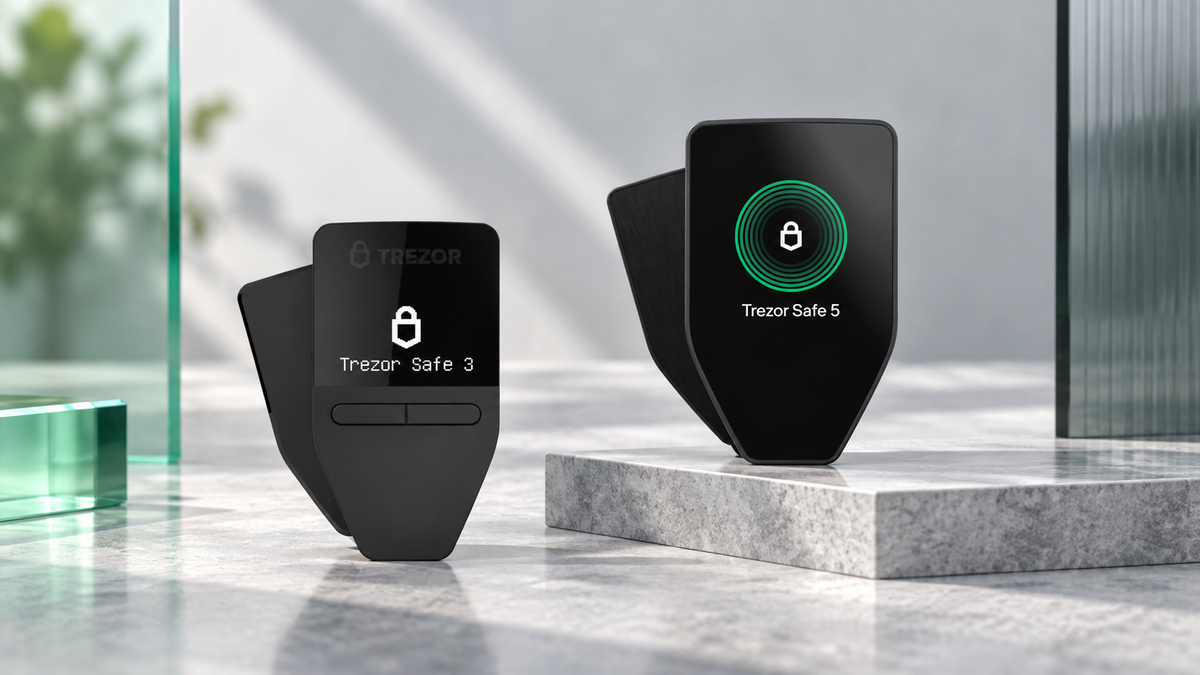
- Trezor Safe 3 is the better-value choice for long-term storage and occasional transactions at THB 3,790.
- Trezor Safe 5 is built for people who want a colour touchscreen, faster device navigation and a more comfortable daily workflow at THB 7,490.
- Both use an EAL6+ Secure Element. The THB 3,700 premium mainly buys a better interface rather than a fundamentally different security tier.
- Both connect over USB-C without Bluetooth. For a complete iPhone workflow, consider Trezor Safe 7 instead.
Trezor Safe 3 and Safe 5 share more security DNA than their prices suggest. The real decision is whether you want the lowest sensible entry price or a device that feels noticeably easier every time you unlock, review and approve a transaction.
The key differences
Safe 3 uses a compact monochrome OLED and two physical buttons. It is simple, light and particularly well suited to a wallet that spends most of its life stored securely. Safe 5 adds a 1.54-inch colour touchscreen, Gorilla Glass 3 and haptic feedback, making PIN entry, passphrase use and on-device review more fluid.
Safe 5 also includes a microSD slot for additional device-protection features. Neither model has Bluetooth; both rely on USB-C.
Trezor Safe 3 vs Safe 5 at a glance
| Feature | Trezor Safe 3 | Trezor Safe 5 |
|---|---|---|
| Price | THB 3,790 | THB 7,490 |
| Display | 0.96-inch monochrome OLED, 128 × 64 | 1.54-inch colour touchscreen, 240 × 240 |
| Controls | Two buttons | Touch with haptic feedback |
| Secure Element | OPTIGA Trust M (V3), CC EAL6+ | OPTIGA Trust M (V3), CC EAL6+ |
| Connection | USB-C | USB-C |
| microSD | No | Yes |
| Size and weight | 59 × 32 × 7.4 mm, 14 g | 65.9 × 40 × 8 mm, 23 g |
| Wallet backup | 12, 20 or 24 words; Multi-share Backup | 12, 20 or 24 words; Multi-share Backup |
| Best for | First-time buyers and long-term holders | Frequent users and touchscreen preference |
Is one model more secure?
Both devices use the same OPTIGA Trust M (V3) Secure Element with CC EAL6+ certification and sit within Trezor's open-source ecosystem. Safe 5 should not be treated as a completely higher security class simply because it costs more.
Its larger display can still improve practical safety. Addresses, amounts and confirmation prompts are easier to inspect, which helps reduce rushed mistakes. Hardware matters, but careful on-device verification remains part of the security model.
Everyday experience
Safe 3 keeps the workflow simple
The two-button interface is easy to understand, although long details and passphrase entry take more clicks. That trade-off is minor for a wallet used only occasionally.
Safe 5 removes friction
The touchscreen speeds up PIN and passphrase entry, while haptic feedback confirms each interaction. It is the more comfortable device for multiple accounts, frequent transfers and users who regularly verify transaction details.
Who should buy each model?
- Your first hardware wallet: Safe 3 covers the essentials at a much lower price.
- Long-term Bitcoin or crypto storage: Safe 3 is usually enough when transactions are infrequent.
- Passphrase or multiple accounts: Safe 5 is substantially easier to operate.
- Frequent transactions: Safe 5 offers the better day-to-day experience.
- Full iPhone use: Both have limitations on iOS; Safe 7 is the more appropriate Trezor for a complete mobile workflow.
Which is better value?
The extra THB 3,700 pays for the colour touchscreen, haptics, tougher display glass, microSD support and a smoother interface. For setup-and-hold storage, Safe 3 is the stronger value. If the device will be used frequently, Safe 5 can justify its premium every time you interact with it.
Our practical recommendation
Choose Safe 3 for maximum value. Choose Safe 5 for maximum ease of use. Either can be a sound long-term wallet when it is bought from a trusted source, initialised by you and paired with responsible Seed Phrase storage.
Shop the two models

Trezor
- CC EAL6+ Secure Element
- OLED display with two-button control
- Excellent value for first-time and long-term users
This button selects Cosmic Black. Current pricing may vary with promotions; check the product page before ordering.

Trezor
- Colour touchscreen and haptic feedback
- CC EAL6+ Secure Element
- Better for frequent use and passphrases
This button selects Black Graphite. Current pricing may vary with promotions; check the product page before ordering.
Frequently asked questions
Is Safe 5 more secure than Safe 3?
They share the same EAL6+ Secure Element foundation. Safe 5 mainly improves on-device review and usability rather than moving into a completely different hardware security tier.
Is Safe 5 worth the extra money?
Yes for frequent transactions, passphrase users and anyone who values a touchscreen. For occasional use and long-term storage, Safe 3 is usually the better buy.
Do they support the same coins?
Their asset support is broadly aligned through Trezor Suite and compatible third-party wallets. Always check the specific coin, token and network before purchasing.
Can they be used with an iPhone?
iOS functionality is limited. For complete setup, sending and device management on iPhone, Trezor Safe 7 is the more suitable option.
Can I move from Safe 3 to Safe 5?
Yes. A compatible wallet can be restored on the new device with the correct Seed Phrase. Enter it only on the hardware wallet, never into a website, chat or computer.
Verdict
Safe 3 is the default recommendation for most buyers: it delivers the core protection at a significantly lower price. Safe 5 is the better tool for active users who will benefit from a touchscreen every time they transact. The right model is the one that matches how often you intend to use it.
Written by Bank · Updated 28 September 2026
Share:
Where to Buy Ledger in Thailand: Authenticity, Authorized Sellers and Warranty
Bitwise NEAR ETF Moves Closer to Launch After NYSE Arca Approval