



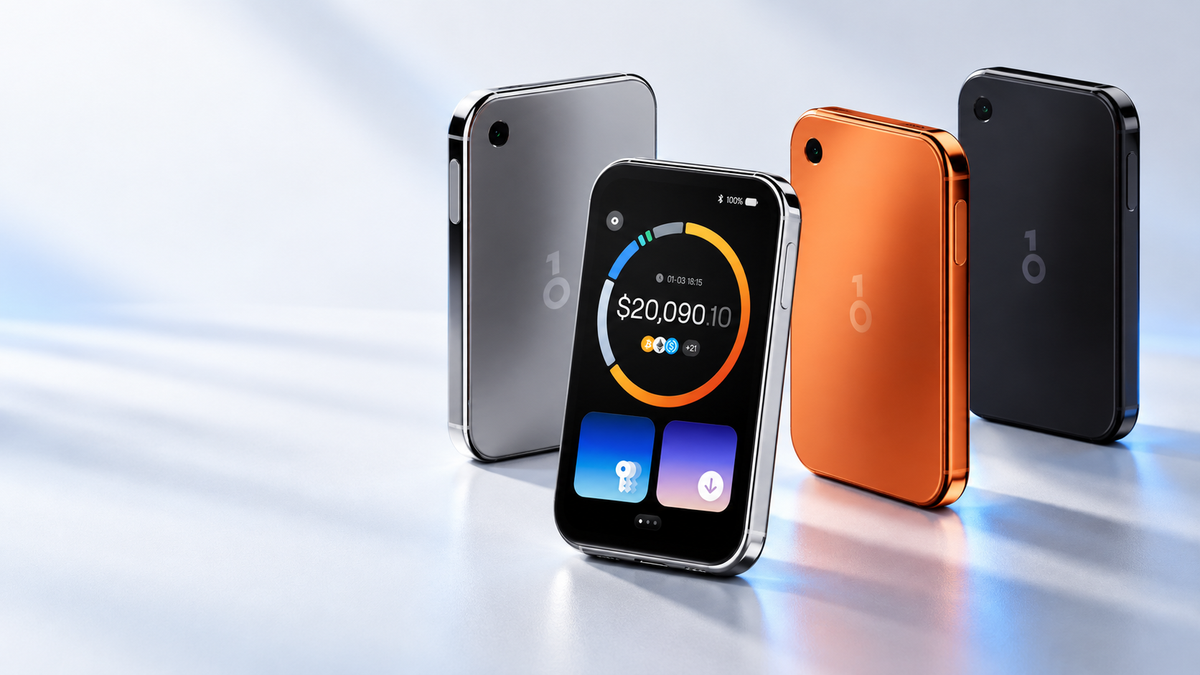
OneKey Pro 2 is a premium hardware wallet built around a large AMOLED touchscreen, a redesigned safeOS 2 interface and a security architecture that separates critical duties across four EAL6+ Secure Element chips. It is thin enough to carry like a card, yet it adds a camera for QR signing, fingerprint-assisted unlocking, wireless charging and several backup options.
This guide looks beyond the headline specifications. It explains what those features change in daily use, where the security benefits come from and what buyers should check before moving funds.
Quick take
- A 3.54-inch AMOLED touchscreen makes addresses, amounts and permissions easier to inspect before signing.
- Four EAL6+ Secure Elements divide sensitive responsibilities instead of concentrating them in one component.
- Transactions can be signed by USB-C, Bluetooth or QR code, depending on the workflow.
- Backup choices include 12 or 24 words, 20-word SLIP-39 shares and compatible NFC backup cards.
- The 700 mAh battery supports USB-C and wireless charging.
What is OneKey Pro 2?
OneKey Pro 2 is the second generation of OneKey's high-end touchscreen wallet. Its role is to keep private keys isolated from the phone or computer used to prepare a transaction. The app builds the request; the wallet displays the details and signs only after the owner confirms them on the device.
The key practical idea is not simply that the wallet is offline. It is that the final decision happens on a screen controlled by the hardware wallet. A compromised computer can still show misleading information, so the address and amount shown on the OneKey Pro 2 should always be treated as the final source of truth.
A screen designed for verification, not decoration
The 3.54-inch AMOLED panel has a resolution of 1024 × 604 pixels, brightness of up to 800 nits and Corning Gorilla Glass 5. The larger, sharper panel gives transaction details more room than a small two-line display, which matters when checking long addresses, token approvals or multi-account activity.
The body measures 84.9 × 53.2 × 6.2 mm and weighs 51 g. A polished aluminium frame, frosted glass back and slim profile make it feel closer to a compact smart device than a traditional USB-style wallet. The fingerprint reader is built into the power button, allowing the device to wake and authenticate in one motion while the PIN remains the primary protection.
safeOS 2: less friction at the moment of signing
safeOS 2 introduces a redesigned interface with new layouts, icons and animations. OneKey says its new runtime architecture raises frame rates by more than 60% compared with the previous software generation. The benefit is not only visual: smoother navigation makes it easier to slow down, review and understand a transaction before approving it.
The device can show account and portfolio information, while the full management experience remains in the OneKey App. Custom wallpapers are available, but the important part is the signing flow: the device should clearly show what is being approved and where assets are going.
Why four Secure Elements matter
OneKey Pro 2 uses four Secure Element chips certified at CC EAL6+. OneKey's design assigns separate responsibilities to different chips. This separation reduces the chance that compromising a single component exposes every sensitive function at once.
Its firmware and software are published as open source, allowing independent researchers to inspect the design. The device also includes first-use verification, tamper-resistant hardware and protective packaging. If abnormal activity is detected, sensitive data can be erased automatically.
USB-C, Bluetooth and QR signing
OneKey Pro 2 supports several workflows. USB-C is the straightforward option for desktop use. Bluetooth is convenient with mobile devices. For users who want to avoid a live cable or wireless session, the built-in camera can scan QR transaction data and return a signed QR code to the app.
QR signing is often described as air-gapped because transaction data moves as images between screens. It reduces reliance on a direct connection, but it does not remove the need to verify the destination, amount and permissions on the wallet itself.
The device also includes NFC for compatible backup accessories and supports passkeys for services that implement FIDO2. Availability of individual functions can depend on the app, platform and service being used.
Backup and recovery choices
Users can create a conventional 12-word or 24-word recovery phrase. OneKey Pro 2 also supports 20-word SLIP-39 backup shares, which can divide recovery material across multiple locations. Compatible OneKey SeedCard backups use NFC and store encrypted data inside the card's chip rather than printing words on the surface.
OneKey Pro 2 specifications
| Category | OneKey Pro 2 | What it means |
|---|---|---|
| Display | 3.54-inch AMOLED, 1024 × 604, up to 800 nits | More space to inspect signing details |
| Security | Four CC EAL6+ Secure Elements | Critical duties are separated across chips |
| Unlocking | PIN with fingerprint-assisted access | Fast daily access without removing PIN protection |
| Connections | USB-C, Bluetooth, QR and NFC functions | Flexible desktop, mobile and disconnected signing workflows |
| Backup | 12/24 words, 20-word SLIP-39 shares, compatible NFC card | Multiple recovery strategies |
| Battery | 700 mAh, USB-C 5V/2A and wireless charging | Designed for portable use and longer standby |
| Dimensions | 84.9 × 53.2 × 6.2 mm; 51 g | Thin, card-like form factor |
| Compatibility | iOS 14+, Android 8+, Windows 10+, macOS 10.11+ and major Linux distributions | Works across common desktop and mobile platforms |
Who should consider OneKey Pro 2?
It is a strong fit for users who manage assets frequently, prefer a large touchscreen, want mobile connectivity and value the option to sign through QR codes. It also suits people who need more than one recovery strategy or want a hardware device that can double as a passkey authenticator.
Users who make only occasional Bitcoin transfers and prefer the simplest possible workflow may not need every feature. A premium interface does not replace disciplined backup storage, address verification and cautious approval of smart-contract permissions.
Checklist before moving funds
- Buy through an official channel and keep the receipt and order details.
- Inspect the packaging, seals, body and ports for signs of opening or modification.
- Install the OneKey App only from OneKey's official website or verified app-store listing.
- Run first-use verification and allow the device to generate a new wallet.
- Never use a recovery phrase supplied in the box or by another person.
- Record the backup offline and perform the recovery check before depositing a large amount.
- Send a small test transaction first, then verify the receiving address on the device screen.
View OneKey Pro 2
See available colours, current stock and full product details from SIAMBC.
View the productConclusion
OneKey Pro 2 combines a genuinely useful large display with a security design that separates critical functions across four Secure Elements. Its strongest advantage is choice: users can connect in several ways, select a recovery model that matches their risk plan and review transactions on a clear screen. The right setup is still the one the owner can verify, back up and recover without relying on anyone else.
Share:
Trezor Reduces Reseller Network After Supply-Chain Scare