
The best Ledger is the one that fits how you actually sign transactions. A buyer who keeps crypto at home and uses a laptop has very different needs from someone who trades on an iPhone or reviews smart contracts every day. This guide compares Ledger Nano S Plus, Nano X, Nano Gen5, Flex and Stax so you can choose by workflow, not simply by price.
The short answer
- Best value for wired desktop use: Ledger Nano S Plus
- Best compact Bluetooth option: Ledger Nano X
- Most affordable secure touchscreen: Ledger Nano Gen5
- Best all-round daily signer: Ledger Flex
- Best premium display and charging experience: Ledger Stax
Understanding the current Ledger lineup
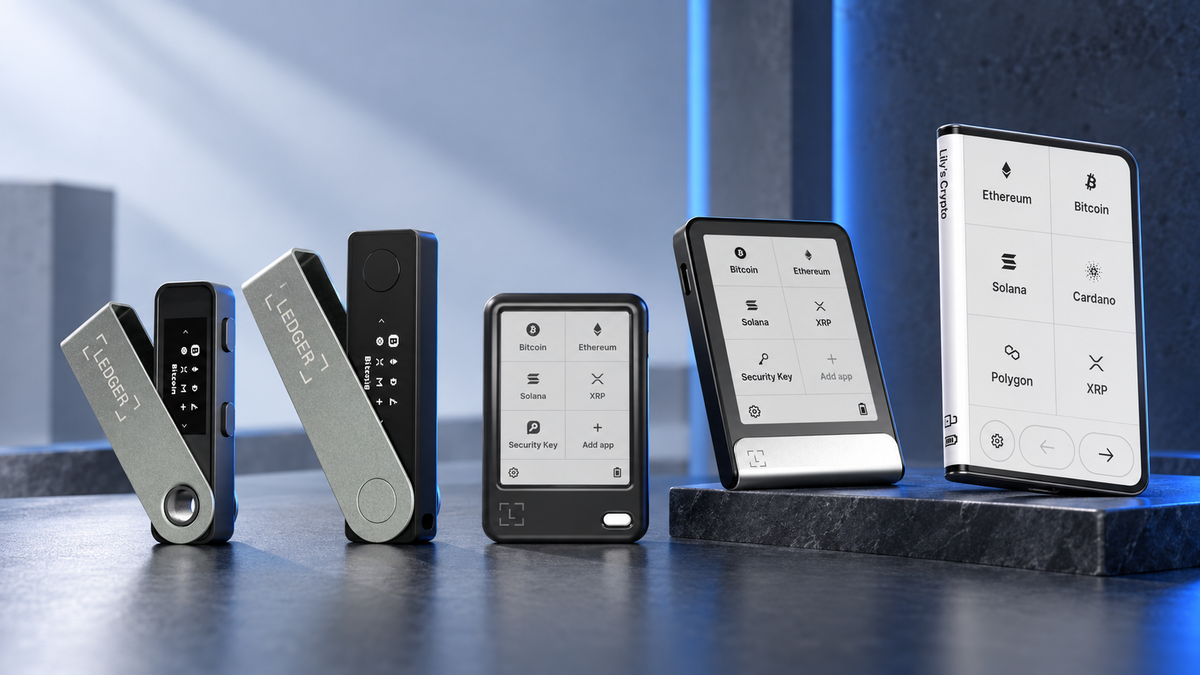
Ledger's current range falls into two families. Nano S Plus and Nano X retain the familiar compact body, small OLED display and two-button controls. Nano Gen5, Flex and Stax move to secure E Ink touchscreens, giving you more room to read transaction details before approval.
Every model keeps private keys inside a Secure Element and asks you to confirm actions on the device. The practical differences are display size, connectivity, battery, recovery options and how comfortable the device feels when you sign regularly.
What about the original Nano S? It is discontinued and is not a sensible new purchase today. Existing units can still function, but new buyers should start with Nano S Plus or a newer model.
Ledger models compared
| Model | Display | Connectivity | Best for | SIAMBC price at publication |
|---|---|---|---|---|
| Ledger Nano S Plus | Button-operated OLED | USB-C | Affordable home and desktop use | THB 2,480 |
| Ledger Nano X | Button-operated OLED | USB-C, Bluetooth | Compact mobile signing | THB 4,200 |
| Ledger Nano Gen5 | 2.8-inch E Ink touchscreen | USB-C, Bluetooth, NFC | Entry into Ledger's touchscreen range | THB 7,540 |
| Ledger Flex | 2.8-inch E Ink touchscreen | USB-C, Bluetooth, NFC | A polished everyday primary signer | THB 10,480 |
| Ledger Stax | 3.7-inch curved E Ink touchscreen | USB-C, Bluetooth, NFC, Qi | Largest display and premium experience | THB 16,800 |
Prices can change with colour, stock and promotions. Check the product page for the current amount.
Ledger Nano S Plus: the value choice
Nano S Plus is the sensible option for long-term holders who normally use a computer. It has no battery and no wireless radio, so it only works while connected by cable. That is limiting for mobile use, but refreshingly simple for a device that spends most of its life stored at home.
The small display and two buttons make PIN entry and long reviews slower than on a touchscreen. In return, you get the core Ledger signing experience at the lowest current price, leaving more of the budget for a durable offline seed backup.
- Strengths: low price, no ageing battery and broad asset support.
- Trade-offs: wired only, no NFC and not a practical iPhone signer.
Ledger Nano X: compact and mobile
Nano X keeps the classic Nano format but adds Bluetooth and a rechargeable battery. It is the better fit when you want to sign from an iPhone or Android phone without carrying a cable, while remaining small enough for a pocket or travel kit.
The compromise is the screen. It is still narrow and button-driven, so frequent DeFi users may prefer a touchscreen for reviewing detailed prompts. Nano X makes the most sense when portability and Bluetooth matter more than screen space.
- Strengths: compact body, Bluetooth and broad phone compatibility.
- Trade-offs: small display, no NFC and a battery that will age over time.
Deciding between these two? Our detailed Nano S Plus vs Nano X comparison puts iPhone support, chips and price side by side.
Ledger Nano Gen5: the touchscreen entry point
Nano Gen5 brings a secure E Ink touchscreen to the Nano family, along with USB-C, Bluetooth and NFC. Addresses, app names and transaction prompts are easier to review than on the classic Nano display, making it a meaningful upgrade for people who sign often.
It is the lowest-priced model in Ledger's current touchscreen group and includes Ledger Recovery Key as an optional NFC backup route. That convenience should complement, not replace, a recovery plan you understand and control yourself.
- Strengths: touchscreen, full connectivity and the lowest price among the E Ink models.
- Trade-offs: less premium screen and materials than Flex, with no Qi charging.
Ledger Flex: the everyday sweet spot
Flex is built for owners who sign regularly and want a clearer device without moving to Ledger's highest price tier. Its 2.8-inch high-resolution E Ink touchscreen makes daily navigation and transaction review far more comfortable than on Nano S Plus or Nano X.
Compared with Nano Gen5, the extra spend goes toward display quality, construction and a more refined overall feel. Compared with Stax, Flex keeps most of the useful platform features while giving up the larger curved display and Qi charging. For many buyers, that is the best balance in the range.
- Strengths: crisp touchscreen, compact format and USB-C, Bluetooth and NFC.
- Trade-offs: costs more than Nano Gen5 and does not support wireless charging.
Ledger Stax: the premium flagship
Stax is defined by its 3.7-inch curved E Ink touchscreen. The larger canvas is easier to read and gives Ledger's interface more room to breathe. It supports USB-C, Bluetooth, NFC and Qi wireless charging in a body roughly the footprint of a bank card.
The higher price buys comfort, industrial design and screen area rather than a completely different class of private-key protection. It suits people who manage several assets, sign frequently and want the least cramped experience Ledger offers.
- Strengths: largest display, curved screen, Qi charging and premium construction.
- Trade-offs: highest price and a larger footprint.
Ledger Stax vs Flex: which should you buy?
Both models provide secure E Ink touchscreens, USB-C, Bluetooth, NFC and an included Ledger Recovery Key. The decision comes down to display size, shape and charging.
- Choose Flex if you want a polished primary signer that stays compact and keeps the budget closer to THB 10,000.
- Choose Stax if the 3.7-inch curved display and Qi charging are features you will genuinely appreciate.
Flex is the better-value choice for most people. Stax is worthwhile when its larger display and design are part of the reason you will use the device confidently. Paying more does not remove the need to protect your seed phrase.
Choose a Ledger by use case
Long-term storage with occasional transactions
Nano S Plus is usually enough. Its wired, battery-free design is inexpensive and easy to store.
iPhone use in the smallest practical format
Nano X is the classic choice for Bluetooth signing. If you also want easier transaction review, step up to Nano Gen5 or Flex.
Frequent DeFi, swaps or smart-contract signing
A larger touchscreen is easier to read. Choose Nano Gen5 for value, Flex for the strongest everyday balance, or Stax for maximum display space.
A backup Ledger
Nano S Plus is the economical backup. Restore and test it with your own recovery phrase, then store the device separately from that phrase.
Shop the Ledger lineup

Ledger
- USB-C connection
- Best for desktop and Android
- Strong value for long-term storage
Adds Matte Black. Other colours are available on the product page.

Ledger
- Bluetooth and USB-C
- Works with iPhone, Android and computers
- Compact travel-friendly design
Adds Onyx Black. Check the product page for stock and other colours.

Ledger
- 2.8-inch E Ink touchscreen
- USB-C, Bluetooth and NFC
- Ledger Recovery Key included
Adds Jet Black. Other colours are available on the product page.

Ledger
- High-resolution E Ink touchscreen
- USB-C, Bluetooth and NFC
- Balanced primary signer
Adds Black Graphite. Other colours are available on the product page.

Ledger
- 3.7-inch curved E Ink touchscreen
- USB-C, Bluetooth, NFC and Qi charging
- Ledger's premium flagship
Frequently asked questions
Which Ledger offers the best value?
Nano S Plus is the best-value model for wired computer or Android use. If you want a touchscreen, Nano Gen5 is the most affordable route into the newer range.
Ledger Stax vs Flex: which is better?
Flex is the practical choice for most buyers. Stax is better when you specifically value its larger curved display and Qi charging.
Which Ledger models work with iPhone?
Nano X, Nano Gen5, Flex and Stax support Bluetooth workflows with iPhone. Nano S Plus does not work with iPhone, because it connects by USB-C cable only and has no Bluetooth.
Are touchscreen models more secure?
A larger screen does not change where your private keys are stored, but it can make transaction details easier to inspect. Security still depends on checking the device display, protecting your recovery phrase and avoiding phishing.
Do I need Ledger Recover?
No. Ledger Recover is optional. You can continue to back up and restore your wallet using a recovery phrase under your own control.
Is it hard to set up a Ledger yourself?
No. You set it up yourself and press every button on the device, from creating the recovery phrase to setting the PIN. Follow the step-by-step screenshots in our Ledger user guides. SIAMBC never sees your recovery phrase and will never ask for it, or for your private key, passphrase or PIN.
Final verdict
Choose Nano S Plus for simple long-term storage, Nano X for compact Bluetooth use, Nano Gen5 for the most affordable touchscreen experience, Flex for the best everyday balance, and Stax for the largest display and most premium design.
Before ordering, confirm the exact coins, networks and phone or computer you plan to use. You can also visit the SIAMBC showroom to handle the devices and discuss the right fit with our team.
This article is educational and is not investment advice. Prices, features and software compatibility can change; check the latest product information before purchase.



Share:
Bitcoin Closes Above Its 50-Week Moving Average: What Does It Mean?
Bitcoin Touches $85,000 Again: Four Forces Behind the Rebound