
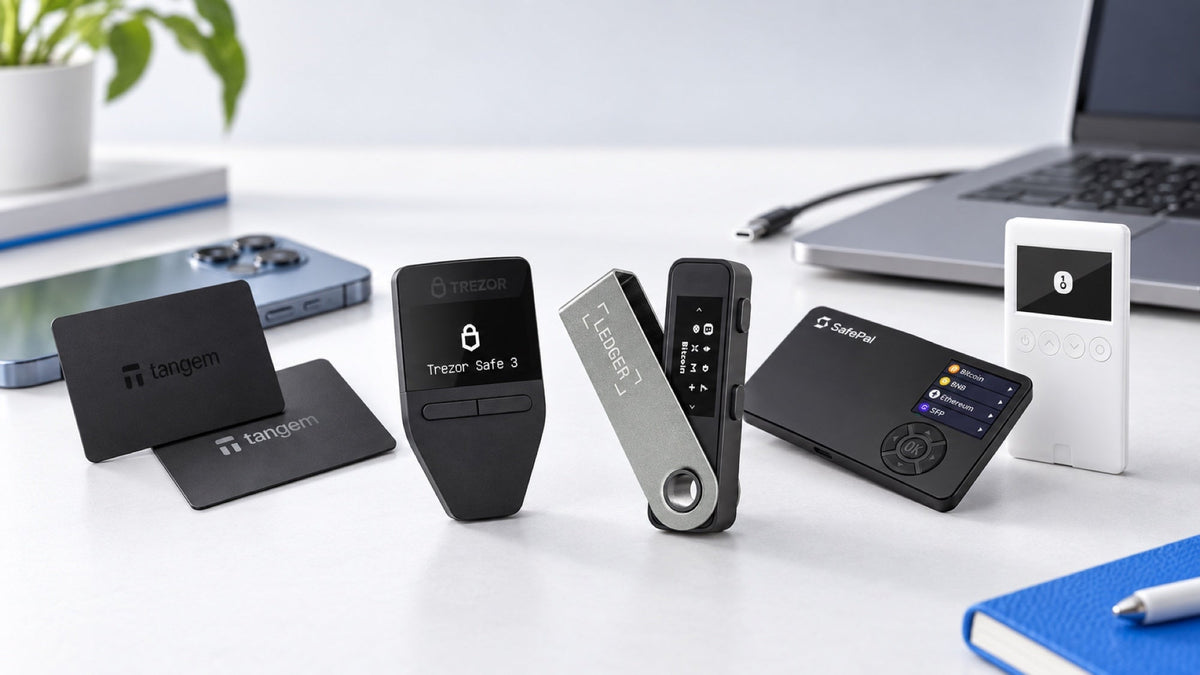
The best first hardware wallet is not automatically the most expensive one. It is the model that works with the phone or computer you already use, supports the exact coins and networks you hold, and has a signing process you can follow without guessing.
Quick recommendations
- Desktop or Android on a smaller budget: Ledger Nano S Plus covers a broad range of assets, but it is not designed for iPhone use.
- The simplest mobile workflow: Tangem uses NFC with iPhone and Android and needs no cable or charging.
- Easy operation with an open-source core: Trezor Safe 3 is a well-balanced first wallet for desktop and Android users.
- QR-based offline signing: SafePal S1 transfers transaction data through its camera and screen.
- One wallet across phone and computer: Ledger Nano X offers a compact mid-range option, while Trezor Safe 7 provides a larger touchscreen and premium interface.
Five questions to answer before choosing
- What will you connect it to? A USB-only model may work well with desktop and Android but not iPhone.
- Which assets and networks do you actually use? Token support, network support and companion-app support are separate checks.
- Do you want a screen on the wallet? A screen lets you verify the destination and amount independently of the phone.
- Which connection method feels natural? USB, Bluetooth, NFC and QR workflows are all different.
- What is the total budget? Leave room for a secure offline recovery-seed backup rather than spending everything on the device.
The fastest way to narrow the list: start with your everyday phone or computer, check the exact assets next, and compare price last.
Choose a hardware wallet by budget
Entry-level budget
Ledger Nano S Plus, Tangem Wallet and SafePal S1 are common starting points with very different workflows. Nano S Plus is strongest when USB is acceptable; Tangem favors mobile convenience; SafePal S1 suits people who specifically want QR-based signing.
Mid-range budget
Trezor Safe 3 is a balanced choice for users who value a straightforward interface and an open-source core. Ledger Nano X costs more than Nano S Plus but adds Bluetooth and iPhone support.
Premium budget
A premium model mainly buys a larger display, easier navigation and broader connectivity. Trezor Safe 7 is suited to users who want a touchscreen and support across iPhone, Android and computers. The premium price does not remove the need to protect the recovery seed.
Choose by the phone or computer you use
If you mainly use an iPhone
Focus on products with explicit iOS support. Tangem works through NFC, Ledger Nano X uses Bluetooth, and Trezor Safe 7 supports a mobile-friendly wireless workflow. Do not assume that a USB-C plug alone guarantees compatibility.
If you mainly use Android
Android offers the widest range: USB-C models, Bluetooth devices, NFC cards and QR wallets can all be practical. The decision comes down to whether you prefer a physical screen, a card-style wallet or a camera-based process.
If you mainly use a computer
USB devices are simple and dependable for regular desktop use. Trezor Safe 3 and Ledger Nano S Plus offer strong value, while touchscreen models make long addresses and prompts easier to review.
Check the exact coins and networks before buying
“Supports thousands of coins” is not enough. Bitcoin is straightforward, but assets such as USDT exist on several networks. XRP, Solana, Cardano and tokens may require different companion apps or third-party wallet interfaces. Check the asset, its network, the required app and the functions you need, such as staking or token management.
Repeat the check before every transfer. A device may support USDT while the sending exchange and receiving address are set to different networks. Always send a small test transaction first.
Hardware wallets for beginners: quick comparison
| Model | Best fit | Connection | iPhone |
|---|---|---|---|
| Ledger Nano S Plus | Broad asset support on a budget | USB-C | No |
| Tangem Wallet | Simple mobile use | NFC | Yes |
| SafePal S1 | QR-based signing | QR camera | Yes, through the app |
| Trezor Safe 3 | Open-source core and clear setup | USB-C | No |
| Ledger Nano X | Portable phone and desktop use | Bluetooth, USB | Yes |
| Trezor Safe 7 | Premium touchscreen workflow | Bluetooth, USB | Yes |
Which model suits which beginner?
- Trezor Safe 3: for beginners who want a transparent, easy-to-follow setup on desktop or Android.
- Tangem: for phone-first users who want the fewest steps and no charging.
- Ledger Nano S Plus: for budget-conscious users who need broad coin support and do not use iPhone for transactions.
- SafePal S1: for users who prefer QR-based communication and a built-in screen.
- Ledger Nano X: for travelers who want a compact Bluetooth device.
- Trezor Safe 7: for users who value a large screen, cross-device use and a premium interface.
Recommended hardware wallets for beginners

Ledger
- USB-C connection
- On-device screen and buttons
- Best for desktop and Android; not iPhone

Tangem
- Tap-to-use NFC workflow
- No cable or battery
- Simple mobile-first option for iPhone and Android

SafePal
- QR-based transaction transfer
- No USB, Bluetooth or Wi-Fi during signing
- Built-in screen and camera


Trezor
- Open-source core design with Secure Element
- Clear on-device verification
- Balanced choice for desktop and Android

Trezor
- Large touchscreen and Bluetooth
- Works with iPhone, Android and computers
- Premium Trezor experience
Common mistakes first-time buyers should avoid
Buying before checking iPhone support
USB-C does not automatically mean iPhone compatibility. Confirm operating-system and app support for the exact model.
Looking only at the number of supported coins
Some assets require a third-party wallet, and some functions are unavailable even when basic transfers work. Check the workflow for the assets you hold.
Assuming the shop or manufacturer stores your seed
The recovery seed must be generated during your own setup. SIAMBC and the manufacturer do not keep a copy and will not ask you for it.
Transferring the full balance first
Test receiving, sending and recovery with a small amount before moving a large portfolio.
Frequently asked questions
How much should a beginner spend?
Spend enough to get a model that fits your devices and assets, then reserve budget for a proper offline backup. A cheaper wallet you understand is better than a premium wallet you avoid using.
Which models work well with iPhone?
Tangem, Ledger Nano X and Trezor Safe 7 are among the options in this guide with clear iPhone workflows.
Is Trezor Safe 3 beginner-friendly?
Yes, especially for desktop and Android users who want a clear setup process and an open-source core design.
Is Tangem safe without a screen?
Tangem uses the phone to display transaction details and the card to authorize actions through NFC. Users who want an independent trusted display may prefer a hardware wallet with its own screen.
Can one wallet hold several coins?
Yes, provided the model, network and companion software support them. The assets remain on their blockchains; the hardware wallet protects the keys used to control them.
Conclusion
Choose the first hardware wallet around your real routine, not a specification sheet. Start with device compatibility, confirm the exact coins and networks, then decide which signing method you will use confidently. For many desktop or Android beginners, Trezor Safe 3 is a strong all-round choice; phone-first users may find Tangem or a Bluetooth model more convenient.



Share:
What Is Tangem Ring? Who Is This Wearable Hardware Wallet For?
How to Prepare a Hardware Wallet for 5–10 Years of Bitcoin Storage