

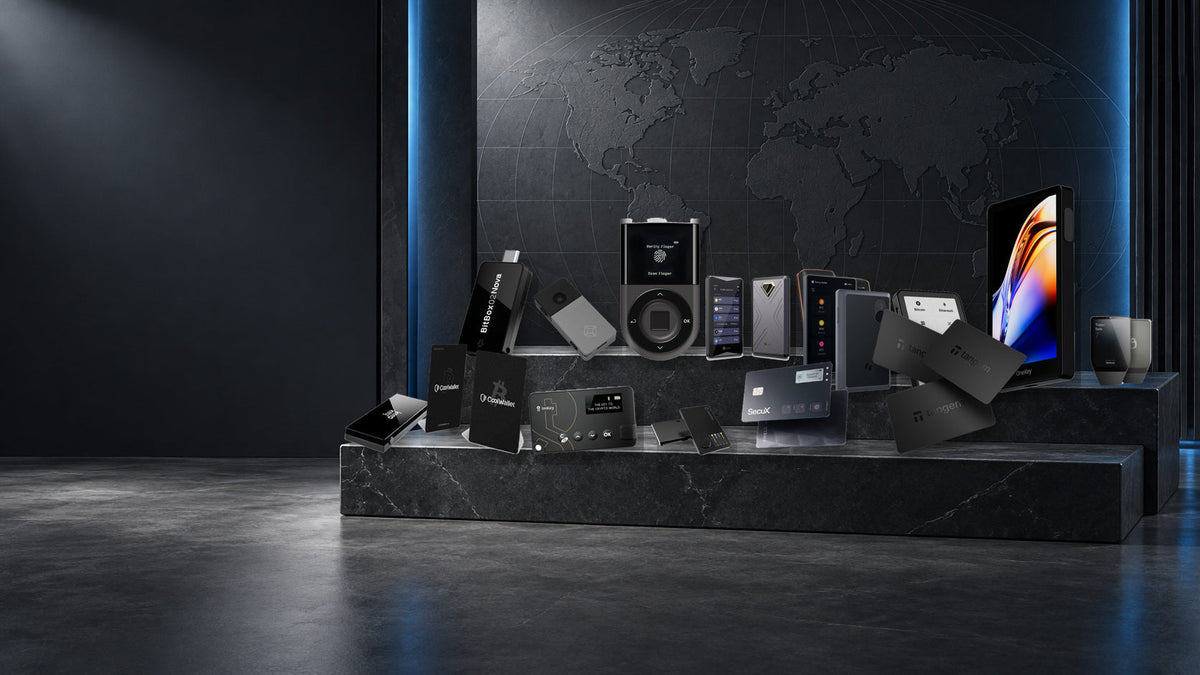
The hardware-wallet market is far broader than Trezor and Ledger. Buyers can now choose between open-source USB devices, QR-based air-gapped wallets, biometric touchscreens, NFC cards and Bitcoin-only designs. This guide compares all 15 brands currently or previously listed by SIAMBC, with an emphasis on how each one feels to use rather than on marketing claims.
The short version
- Simple and open-source: Trezor and BitBox
- Broad multi-chain ecosystems: Ledger, OneKey and SafePal
- Phone-first card wallets: Tangem, CoolWallet, ELLIPAL X Card and SecuX Shield BIO
- QR-based air-gapped use: Keystone, ELLIPAL and SafePal S1 Series
- Bitcoin-focused: Blockstream Jade and Foundation Passport
- On-device biometrics: D'CENT, Keystone 3 Pro and SecuX Shield BIO
What actually separates hardware-wallet brands
Every device on this page is designed to keep private keys away from an everyday phone or computer, but that shared goal does not make the products interchangeable. A USB wallet with its own screen creates a different signing workflow from an NFC card. A QR wallet avoids a direct data connection, while a Bluetooth wallet prioritises mobility. Open-source code, secure-element design, recovery options and third-party wallet support also vary by brand.
Start with the device you use most, the networks you genuinely need and the information you want to verify on the wallet itself. Then consider how you will back up and recover the wallet. Coin count and price are useful filters, but neither one measures security on its own.
Fifteen-brand hardware-wallet comparison
| Brand | Core approach | Best suited to | Entry product at SIAMBC |
|---|---|---|---|
| Trezor | Open-source desktop and mobile workflow | Beginners and transparency-focused users | Trezor One, ฿2,990 |
| Ledger | Secure element with a large multi-chain ecosystem | Users with diverse portfolios | Nano S Plus, ฿2,060 |
| OneKey | Open-source, multi-chain Web3 devices | DApp users wanting modern hardware | Classic 1S Pure, ฿2,990 |
| Tangem | Battery-free NFC cards and ring | Phone-first users | 2 Cards Set, ฿2,190 |
| SafePal | QR air gap or Bluetooth, depending on model | Value-conscious mobile users | SafePal S1, ฿2,190 |
| CoolWallet | Credit-card form with NFC or Bluetooth | Everyday carry | CoolWallet Go, ฿2,990 |
| SecuX | Large touchscreens and biometric card options | Users who value readable verification | SecuX W10, ฿2,100 |
| D'CENT | Fingerprint sensor and physical controls | Biometric authentication on the device | Biometric Wallet, ฿6,990 |
| ELLIPAL | QR air gap plus a separate NFC-card line | Users avoiding wired and Bluetooth data links | ELLIPAL X Card, ฿2,490 |
| Keystone | Large touchscreen, QR signing and fingerprint reader | Home use and detailed transaction review | Keystone 3 Pro, ฿5,990 |
| BitBox | Open-source simplicity with Bitcoin-only option | Desktop users who value auditability | BitBox02, ฿6,490 |
| Blockstream | Open-source Bitcoin and Liquid wallets | Bitcoin users seeking strong value | Jade Classic, ฿3,190 |
| Foundation | Premium open-source Bitcoin workflow | Dedicated Bitcoin self-custody | Passport Prime, ฿18,900 |
| imKey | Compact mobile multi-chain wallet | imToken and phone-centric users | imKey Pro, ฿3,490 |
| KeepKey | Classic open-source design with a large OLED screen | Collectors and users studying early hardware wallets | KeepKey, ฿3,990 (sold out) |
Prices shown were current when this article was prepared and may change with colour, promotion and availability.
Mainstream multi-chain wallets
Trezor
Trezor combines an approachable interface with a strong open-source culture. Trezor Suite keeps the core workflow coherent, while the Safe range spans the affordable Safe 3, touchscreen Safe 5 and flagship Safe 7. It is an especially sensible starting point for buyers who want to understand what the wallet is doing instead of relying on a complicated stack of apps.
Ledger
Ledger offers the broadest range of form factors in this group, from the cable-only Nano S Plus to the E Ink touchscreen Flex and Stax. Its strength is the surrounding multi-chain ecosystem and extensive app support. The trade-off is that not every part of the firmware stack is open in the same way as Trezor or BitBox.
OneKey
OneKey targets active Web3 users while keeping an open-source approach. The Classic 1S range is thin and portable; the Pro adds a touchscreen and fingerprint reader. It makes sense for users who regularly connect to DApps, provided they confirm support for the exact chain and third-party wallet they use.
imKey
imKey Pro is a compact option built around mobile multi-chain use. It is easy to carry and sits naturally alongside an app-driven workflow. Buyers who sign complex transactions frequently may still prefer a larger display.
KeepKey
KeepKey is a classic USB hardware wallet with a large OLED display and open-source software. It remains useful for understanding the earlier generation of self-custody devices, but current stock is sold out and its surrounding ecosystem is narrower than newer alternatives. Buyers shopping for a primary wallet today should generally start with Trezor, Ledger or BitBox instead.
Phone-first and card wallets
Tangem
Tangem places the secure element inside a card or ring and uses NFC for signing. There is no battery to maintain, and setup can use a seed phrase or Tangem's seedless approach. It is one of the shortest routes into self-custody, but most transaction information is reviewed on the phone rather than a separate wallet screen.
CoolWallet
CoolWallet keeps the credit-card format while offering two different experiences. The S and Pro use Bluetooth and include a small display and button; the Go removes the battery and signs by NFC. The right choice depends on whether on-card verification or a simpler battery-free design matters more.
SecuX and D'CENT
SecuX ranges from large touchscreen desktop devices to the fingerprint-enabled Shield BIO card. D'CENT takes a more traditional device shape with its own OLED display, controls and fingerprint sensor. Biometrics improve unlocking convenience, but they do not replace a recovery backup or careful transaction review.
Air-gapped and touchscreen wallets
SafePal
SafePal lets buyers choose their connection model. The S1 and S1 Pro exchange transaction data by QR code, while the X1 uses Bluetooth. The prices are accessible, but buyers should choose by workflow rather than assuming the Pro or newer model is automatically right for them.
Keystone
The Keystone 3 Pro uses a four-inch touchscreen, QR signing and a fingerprint reader. Its large display makes transaction review comfortable, particularly with compatible third-party wallets. The size works better as a home device than as something carried every day.
ELLIPAL
ELLIPAL's Titan models avoid Wi-Fi, Bluetooth and USB data transfer, using QR codes instead. The metal Titan 2.0 emphasises durability, while the Titan Mini is smaller. The X Card takes a separate NFC-based route for users who want a slim phone companion.
Bitcoin-focused and open-source wallets
BitBox
Swiss-made BitBox02 devices pair a restrained interface with the open-source BitBoxApp. Multi-asset and Bitcoin-only editions are available, and the newer Nova modernises the screen and controls. It is a strong fit for desktop users who want a focused experience without sacrificing build quality.
Blockstream
The Jade family focuses on Bitcoin and Liquid, with open-source hardware and software and support for QR-oriented workflows. Classic, Core and Plus models cover different budgets. Jade is attractive to users who want to explore Bitcoin self-custody without moving immediately into premium pricing.
Foundation
Passport Prime is a premium Bitcoin device made in the United States, with an open-source hardware and software approach. Its large display, camera and recovery design are built for dedicated Bitcoin use. The price makes it a specialist choice rather than a default recommendation for beginners.
How to choose
For a first hardware wallet: Trezor Safe 3 offers a balanced combination of clear software, open-source code and a secure element. Phone-first buyers may find Tangem or CoolWallet Go quicker to use, but those cards do not provide a separate screen.
For many networks and regular DeFi use: compare Ledger, OneKey and SafePal. A touchscreen model can make long addresses and signing details easier to read, but always confirm support for the exact asset, network and wallet application before buying.
For QR-based signing: consider Keystone 3 Pro, ELLIPAL Titan 2.0 or SafePal S1 Pro. Air-gapped communication reduces direct interfaces, but it does not remove the need to verify every transaction.
For Bitcoin: Blockstream Jade is the value pick, BitBox02 offers a refined minimalist workflow, and Foundation Passport Prime serves the premium end. Trezor remains a flexible middle ground if other assets may be added later.
Featured products from every brand


Frequently asked questions
Which hardware-wallet brand is best?
There is no universal winner. Trezor is particularly approachable and open-source, Ledger has a broad multi-chain ecosystem, Tangem excels at phone-first simplicity, QR users can look to Keystone or ELLIPAL, and Bitcoin specialists should compare Blockstream, BitBox and Foundation.
Does supporting more coins make a wallet safer?
No. Asset coverage is a software capability. Security depends on the device architecture, transaction verification, genuine firmware and how the owner protects recovery information.
Is an air-gapped wallet always safer?
Not automatically. QR signing reduces direct data interfaces, but a user can still approve a malicious transaction. A clear screen and disciplined verification matter regardless of the connection method.
Should I buy from a local authorised retailer?
Use a seller with traceable stock, a clear warranty and support that never requests a seed phrase, PIN or passphrase. SIAMBC lets customers compare devices in person, while all secret setup steps remain under the owner's control.
Conclusion
Choose a brand by workflow, not by reputation alone. Trezor Safe 3 is a balanced first wallet; Ledger and OneKey suit broad multi-chain use; Tangem and CoolWallet serve mobile users; SafePal, Keystone and ELLIPAL cover QR signing; and Blockstream, BitBox and Foundation provide distinct Bitcoin-focused options. Before ordering, list the assets, devices and recovery method you will actually use, then compare the hardware in person if possible.
This article is educational and is not investment advice. Prices, features and asset support can change; check the current product page before purchase.

Share:
Ledger Sync Explained: Private Account Sync Across Your Devices