Updated for 2026. This article explains what a YubiKey is. For why SMS one-time codes stopped being enough in Thailand, and which model to choose, see why SMS OTP no longer protects you.

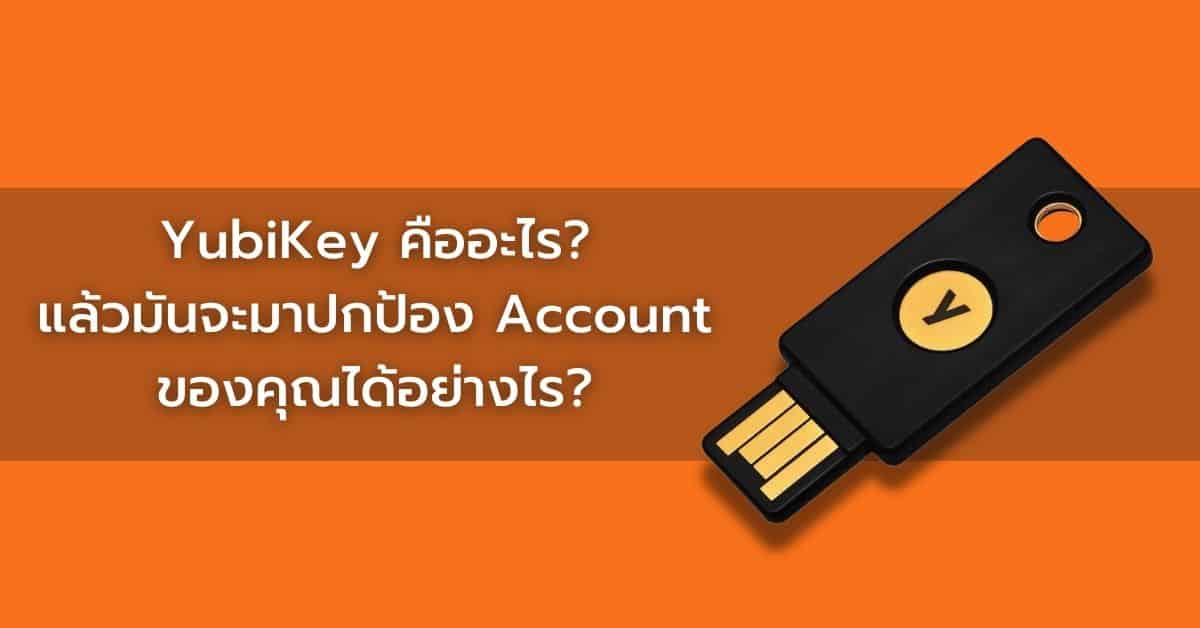
A YubiKey is a small device that helps keep your online accounts secure using 2FA — two-factor authentication. It can protect a number of your accounts, such as Google, Facebook, Gmail, YouTube, Binance, Twitter, Outlook and many more. You simply enter your usual password, tap the YubiKey, and you are logged in.

Each YubiKey has a code generated for that individual device, used to verify identity — rather like the OTP code on a phone that everyone is familiar with. To get started you just plug the YubiKey into your computer, tap the device and log in. For some YubiKey models — the YubiKey Security Key, Security Key C, YubiKey 5 NFC and 5C NFC — users can also use it with an NFC-capable phone by holding the YubiKey close to the phone to verify.

Getting to know 2FA, the cyber security system

Before understanding how a YubiKey works and what it is for, we need to understand two-factor authentication.

A fact many people may not realise is that passwords do not provide cyber security for users. Most passwords are easily guessed by attackers, and even a password devised carefully to be highly secure can still leak. Sometimes a password leaking is unavoidable in the online world. Relying on a password alone as the security for a user account is therefore not a safe answer.

Two-factor authentication means that reaching an account does not use a password alone, but something else to verify the user's identity as well. The first kind of 2FA is verification by SMS or email, where the application sends you a code such as an OTP to verify your identity at the login step. This is arguably the easiest, because users do not have to install any software or buy any hardware. However, using 2FA by SMS OTP or email alone carries the risk that an attacker can steal the code.

The other form many people will be familiar with is 2FA through a phone application such as Google Authenticator or Authy. This method is widely used, but it can be slightly awkward, because the user has to have a phone with that application installed rather than only a laptop or computer, and has to pick up the phone, open the application and type the code on the laptop or computer keyboard. On top of that, applications on phones and computers are connected to the internet all the time, so an attacker can steal the code relatively easily.

How a YubiKey works, for security that is simpler and more convenient

A YubiKey gives users a form of two-factor authentication unlike the two above, which is both more secure and the least awkward: verification through hardware. The application asks the user to plug the YubiKey into their device to connect, and then to tap the YubiKey to verify. Verifying through hardware is the most secure method, because the code is long and constantly changing, and it is convenient because the user does not have to type the whole verification code themselves. Beyond that, using a YubiKey over NFC wirelessly on the YubiKey Security Key, Security Key C, YubiKey 5 NFC and 5C NFC makes using it with a phone easier still.

Why a YubiKey is better than other forms of 2FA

  • More convenient. Compared with SMS OTP, email or an authenticator application, where the user has to copy the code and paste it into the verification step, or type it out themselves, with a YubiKey the user only presses a button to confirm.
  • A longer code. Other 2FA methods send the user a six-digit code, because if the user has to type the verification code themselves, an over-long code only creates difficulty. A YubiKey user does not have to type out the whole code the device produces, so the verification code can be as long as you like — and the longer it is, the safer it is from attackers.
  • Easy to move between devices. When a user gets a new laptop or computer, simply disconnect the YubiKey from the old device and plug it into the new one, and you can log straight in to your applications. One key can be used to log in to the same account across several devices, which is easier than moving other forms of 2FA across.
  • Protects against attack. Normally an attacker can steal a user's code through access to SMS or email, because that data is connected online at all times. Using a YubiKey makes stealing that data harder, because the code is stored offline on the YubiKey itself. Without knowing the account password and without having our YubiKey, an attacker cannot log in at all.

How to set up a YubiKey

Setting up a YubiKey is no different from setting up 2FA through an application. The steps are:

  • Plug the YubiKey into your computer or laptop.
  • Go to Yubico.com/setup and select your device, or connect it from within the various sites and applications such as Facebook, Google, Outlook, Binance and others.
  • Check the list of applications that can be used, and choose the ones you want to secure.
  • Follow the instructions. (How the device behaves varies with the application it is used with.)

What if you lose your YubiKey?

Although using 2FA through a YubiKey may look complicated, once you are used to it, it is no longer complex — and the benefit is well worth it, adding an enormous extra layer of security to valuable assets or information. We recommend having two YubiKeys, keeping one as a backup. If the YubiKey is lost, you can reach your account using the backup. Alternatively you can set up another form of 2FA alongside it, so that when your YubiKey is lost you can log in using 2FA through an app or website. You can also use a service such as LastPass, a site that lets users store YubiKey information and passwords for both security and ease of use.

Latest Stories

查看全部

Six YubiKey security key models sold by SIAMBC in Thailand

Why SMS OTP no longer protects you in Thailand

Thais lost 115.3 billion baht to scams last year, and the six-digit code sent to your phone is the part attackers break most often. How SMS codes are stolen, why an authenticator app only half fixes it, and what a security key does differently.

阅读更多关于Why SMS OTP no longer protects you in Thailand

COLDCARD Q and Mk5 hardware wallets against a dark red security alert background, with a cracked shield graphic and a Bitcoin coin

Coldcard 事件之后,比特币究竟流向了哪里

标题都说持币者逃回了交易所。但链上数据显示资金分成了三路,其中占比最大的一路,流向的是用户自己新建的钱包。

阅读更多关于Coldcard 事件之后,比特币究竟流向了哪里

Ledger Nano S Plus, Tangem Wallet cards and Trezor Safe 3 hardware wallets on a light studio background

Do You Need a Hardware Wallet If Your Crypto Is on Bitkub?

Leaving crypto on a licensed Thai exchange is not automatically wrong, and the tax exemption is a real reason to keep the account. Where the line actually sits, using what has happened here.

阅读更多关于Do You Need a Hardware Wallet If Your Crypto Is on Bitkub?